Free Medical Chart Templates for Clinicians
What's the secret to quality healthcare?
There’s an actual answer here.
Dr. Avedis Donabedian wrote one of the most cited papers on American public health. In it, he shared a truth that likely lives in your bones.
“Ultimately, the secret of quality is love. You have to love your patient, you have to love your profession…” — Dr. Donabedian, Pioneer in Healthcare Quality
It’s not really a secret, is it?
Of course, love isn’t the only part of the job. Today, every clinician has to balance a patient's care with the patient chart.
Your notes shouldn't have to come home with you. The right tools can help. We've created free, downloadable medical chart templates, so you can do what you love and still go home on time.
Free medical chart templates
Let's give you some time back with these free, downloadable patient chart templates.
Whether you need chart templates for initial visits or long-term care, these tools are designed to be:
- Editable: Customize the patient chart template to suit your practice.
- Printable: Keep paper copies handy.
- HIPAA-compliant: Ensure patient privacy and legal compliance.
Standard SOAP note template
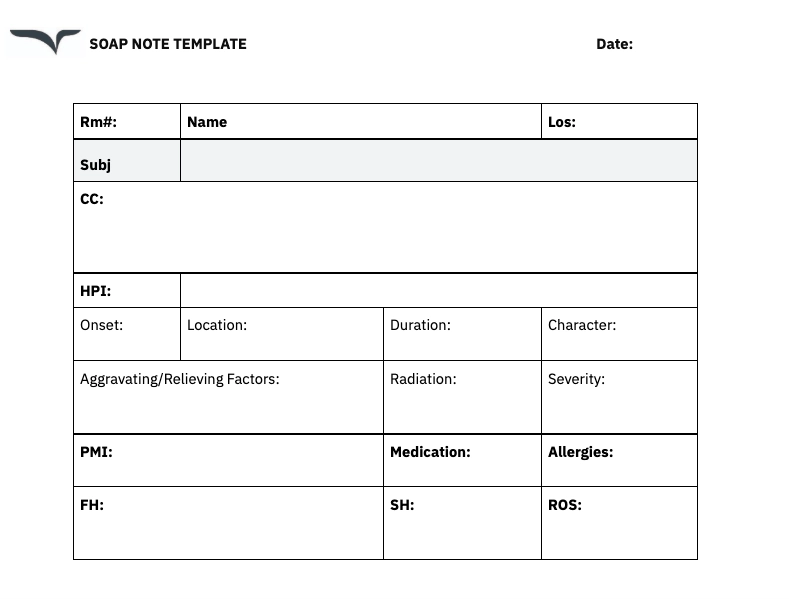
📌 Download for free: Get 1 pt/pg Portrait patient chart template for free.
This SOAP patient chart template uses one of the most popular progress note formats.
- Subjective: The patient's POV, including chief complaint, history of present illness (HPI), past medical history (PMI), and other health information (e.g., known allergies, and medication details).
- Objective: Much like a patient observation chart, this is all of the relevant data you find during examination, like vital signs, lab results, image reports, other test results, and more.
- Assessment & Plan: Analysis of the medical diagnosis, differential diagnosis, medical data and next steps (such as a surgical procedure, prescription, or follow-up).
Feel free to adjust each section for your practice and specialty.
Prerounding template
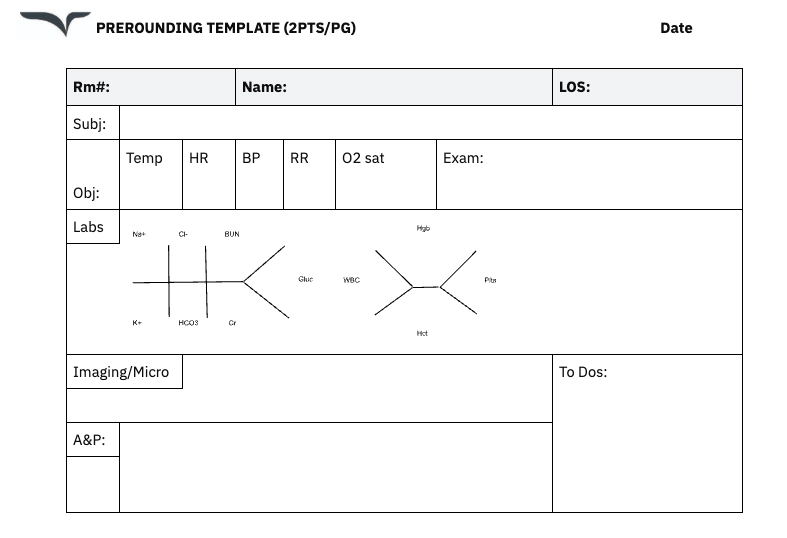
📌 Download for free: Get in 2 pts/pg Portrait or 3pts/pg Landscape.
A hospital preround is common for medical students and residents. Here, you'll quickly outline necessary information (e.g., overnight changes, exam findings, and next steps) to later relay to the healthcare provider.
What should a medical chart include?
In general, each patient chart template includes:
- Patient information: Demographics, contact details, and insurance information.
- Medical history: Past diagnoses, surgeries, medications, and allergies.
- Current complaints: Symptoms and concerns reported by the patient.
- Clinical findings: Examination results, lab reports, and imaging studies.
- Treatment plan: Prescribed medications, consultations with specialties, therapies, or follow-up instructions.
Of course, no two notes are the same. It all depends on your specialty and practice.
For example, here's a SOAP note template written for Pain Management by Dr. Sean Ormond at Atlas Pain Specialists.
Subjective (S):
- Chief complaint: “Pain in [location].”
- Pain rating: [0–10 scale].
- Description: [e.g., burning, sharp, constant].
- Timing and triggers: [e.g., worse in the morning, better with rest].
- Functional impact: [e.g., difficulty climbing stairs, poor sleep].
Objective (O):
- Vitals: [e.g., BP 120/80, HR 75].
- Physical exam: [e.g., tenderness at L4, limited range of motion].
- Imaging or tests: [e.g., MRI shows herniation at L5-S1].
Assessment (A):
- Primary diagnosis: [e.g., chronic radiculopathy].
- Secondary issues: [e.g., insomnia related to pain].
Plan (P):
- Medications: [e.g., increase gabapentin to 600 mg twice daily].
- Therapy: [e.g., refer to PT for core strengthening].
- Procedures: [e.g., schedule epidural steroid injection].
- Follow-up: [e.g., reassess in 4 weeks].
Use AI scribes for medical charts
Want more than a template? AI scribes write progress notes in real time.
Unlike traditional medical transcription, these tools are able to understand the context of a conversation to summarize and create ready-to-use notes.
These AI-powered medical scribes have:
- Automatic formatting: Notes are instantly organized into the SOAP note format.
- Instant integrations: Freed's AI scribe integrates with the top EHRs.
- Customizable notes: AI can train on your writing style and adapt to your preferences.
- Top-tier security: Fully HIPAA-compliant, with no storage of audio notes.
- Cross-device compatibility: Use on desktops, tablets, or smartphones.
For example, if a patient visits with knee pain, the AI identifies key details, like pain scale and mobility limitations, while skipping unrelated information.
This level of precision not only saves time but ensures every note is accurate and—most importantly— actionable.
Explore Freed’s medical chart templates
If you’ve ever wished your templates could think a step ahead of you — they can. Freed’s built-in medical chart templates are designed by clinicians, for clinicians, and built right into your AI scribe. They go far beyond static PDFs: they adapt to your workflow, your note style, and your specialty.
| What you need from a chart template | Downloadable template alone | Freed’s built-in chart templates |
|---|---|---|
| Specialty fit | Generic SOAP and prerounding templates require manual edits to match your specialty’s fields, terminology, and section order. | Freed includes dozens of templates tailored to specialties like family medicine, pediatrics, psychiatry, and more — structured for real-world visits, not generic outlines. |
| Customization | Static PDF templates can be edited, but changes aren’t saved or applied automatically to future notes. | Edit notes and get templates that learn your preferences, or upload new templates in seconds. |
| Note generation | A template gives you the structure. You still fill in every section manually after each visit. | Freed writes the note for you in real time. The template is the format — Freed provides the content, organized automatically from the visit. |
| Consistency across the team | Shared templates help standardize structure, but individual clinicians still write in their own way. Variation creeps in. | In group plans, clinicians can share templates across the entire practice — standardized documentation without extra admin setup. |
| Learning your style | Templates don’t adapt. A static PDF looks the same after 500 visits as it did on day one. | Freed learns your preferred note structure automatically. Every edit trains your templates to sound more like you — consistent and ready for your EHR. |
| Getting notes into your EHR | Notes written in a template have to be manually transcribed or copy-pasted into the EHR — a second pass that takes time and introduces errors. | Use templates in any browser-based EHR via Freed’s Chrome Extension, or push notes directly with one click. Notes land in the right fields instantly. |
| After-hours charting | Clinicians using static templates still spend evenings finishing notes. The template speeds up structure, not completion. | “I have more time to spend doing other things I enjoy — getting home early, rather than staying late at the office trying to finish my charts.” — Dr. Olusesan Olotu, MD |
Here’s what makes them different:
Specialty-specific
Freed includes dozens of templates tailored to specialties like family medicine, pediatrics, psychiatry, and more. Each one is structured for real-world visits, not generic SOAP outlines.
Fully customizable
Edit, rename, or reorder sections to match how you chart. Want to add your own macros or prompts? Build custom templates from scratch in minutes — no coding, no formatting headaches.
Shareable across teams
In group plans, clinicians can share templates across the entire practice. That means standardized, high-quality documentation without extra admin setup.
Smart by design
Freed learns your preferred note structure automatically. Every edit you make trains your templates to sound more like you — accurate, consistent, and ready for your EHR.
Easy export and integration
Use your templates in any web-based EHR via Freed’s Chrome Extension or one-click EHR push for browser-based EHRs. Notes land in the right fields instantly.
“I have more time to spend doing other things I enjoy - getting home early, rather than staying late at the office trying to finish my charts or taking my charts home and doing them over the weekend”. — Dr. Olusesan Olotu, MD, Family Medicine
More templates for your chart
A chart is more than one note. Browse our clinical notes templates by specialty. Use the progress note template for follow-ups. Add doctor visit templates for appointment records.
Taking the next step
Accurate charting doesn’t have to mean sacrificing time or energy.
These medical chart templates or an AI scribe are designed to be fast, simple, and accurate, so you can focus on what you love.
After all, the real secret to quality is you. Try our AI scribe for free.

Table of Contents
What's the secret to quality healthcare?
There’s an actual answer here.
Dr. Avedis Donabedian wrote one of the most cited papers on American public health. In it, he shared a truth that likely lives in your bones.
“Ultimately, the secret of quality is love. You have to love your patient, you have to love your profession…” — Dr. Donabedian, Pioneer in Healthcare Quality
It’s not really a secret, is it?
Of course, love isn’t the only part of the job. Today, every clinician has to balance a patient's care with the patient chart.
Your notes shouldn't have to come home with you. The right tools can help. We've created free, downloadable medical chart templates, so you can do what you love and still go home on time.
Free medical chart templates
Let's give you some time back with these free, downloadable patient chart templates.
Whether you need chart templates for initial visits or long-term care, these tools are designed to be:
- Editable: Customize the patient chart template to suit your practice.
- Printable: Keep paper copies handy.
- HIPAA-compliant: Ensure patient privacy and legal compliance.
Standard SOAP note template
📌 Download for free: Get 1 pt/pg Portrait patient chart template for free.
This SOAP patient chart template uses one of the most popular progress note formats.
- Subjective: The patient's POV, including chief complaint, history of present illness (HPI), past medical history (PMI), and other health information (e.g., known allergies, and medication details).
- Objective: Much like a patient observation chart, this is all of the relevant data you find during examination, like vital signs, lab results, image reports, other test results, and more.
- Assessment & Plan: Analysis of the medical diagnosis, differential diagnosis, medical data and next steps (such as a surgical procedure, prescription, or follow-up).
Feel free to adjust each section for your practice and specialty.
Prerounding template
📌 Download for free: Get in 2 pts/pg Portrait or 3pts/pg Landscape.
A hospital preround is common for medical students and residents. Here, you'll quickly outline necessary information (e.g., overnight changes, exam findings, and next steps) to later relay to the healthcare provider.
What should a medical chart include?
In general, each patient chart template includes:
- Patient information: Demographics, contact details, and insurance information.
- Medical history: Past diagnoses, surgeries, medications, and allergies.
- Current complaints: Symptoms and concerns reported by the patient.
- Clinical findings: Examination results, lab reports, and imaging studies.
- Treatment plan: Prescribed medications, consultations with specialties, therapies, or follow-up instructions.
Of course, no two notes are the same. It all depends on your specialty and practice.
For example, here's a SOAP note template written for Pain Management by Dr. Sean Ormond at Atlas Pain Specialists.
Subjective (S):
- Chief complaint: “Pain in [location].”
- Pain rating: [0–10 scale].
- Description: [e.g., burning, sharp, constant].
- Timing and triggers: [e.g., worse in the morning, better with rest].
- Functional impact: [e.g., difficulty climbing stairs, poor sleep].
Objective (O):
- Vitals: [e.g., BP 120/80, HR 75].
- Physical exam: [e.g., tenderness at L4, limited range of motion].
- Imaging or tests: [e.g., MRI shows herniation at L5-S1].
Assessment (A):
- Primary diagnosis: [e.g., chronic radiculopathy].
- Secondary issues: [e.g., insomnia related to pain].
Plan (P):
- Medications: [e.g., increase gabapentin to 600 mg twice daily].
- Therapy: [e.g., refer to PT for core strengthening].
- Procedures: [e.g., schedule epidural steroid injection].
- Follow-up: [e.g., reassess in 4 weeks].
Use AI scribes for medical charts
Want more than a template? AI scribes write progress notes in real time.
Unlike traditional medical transcription, these tools are able to understand the context of a conversation to summarize and create ready-to-use notes.
These AI-powered medical scribes have:
- Automatic formatting: Notes are instantly organized into the SOAP note format.
- Instant integrations: Freed's AI scribe integrates with the top EHRs.
- Customizable notes: AI can train on your writing style and adapt to your preferences.
- Top-tier security: Fully HIPAA-compliant, with no storage of audio notes.
- Cross-device compatibility: Use on desktops, tablets, or smartphones.
For example, if a patient visits with knee pain, the AI identifies key details, like pain scale and mobility limitations, while skipping unrelated information.
This level of precision not only saves time but ensures every note is accurate and—most importantly— actionable.
Explore Freed’s medical chart templates
If you’ve ever wished your templates could think a step ahead of you — they can. Freed’s built-in medical chart templates are designed by clinicians, for clinicians, and built right into your AI scribe. They go far beyond static PDFs: they adapt to your workflow, your note style, and your specialty.
| What you need from a chart template | Downloadable template alone | Freed’s built-in chart templates |
|---|---|---|
| Specialty fit | Generic SOAP and prerounding templates require manual edits to match your specialty’s fields, terminology, and section order. | Freed includes dozens of templates tailored to specialties like family medicine, pediatrics, psychiatry, and more — structured for real-world visits, not generic outlines. |
| Customization | Static PDF templates can be edited, but changes aren’t saved or applied automatically to future notes. | Edit notes and get templates that learn your preferences, or upload new templates in seconds. |
| Note generation | A template gives you the structure. You still fill in every section manually after each visit. | Freed writes the note for you in real time. The template is the format — Freed provides the content, organized automatically from the visit. |
| Consistency across the team | Shared templates help standardize structure, but individual clinicians still write in their own way. Variation creeps in. | In group plans, clinicians can share templates across the entire practice — standardized documentation without extra admin setup. |
| Learning your style | Templates don’t adapt. A static PDF looks the same after 500 visits as it did on day one. | Freed learns your preferred note structure automatically. Every edit trains your templates to sound more like you — consistent and ready for your EHR. |
| Getting notes into your EHR | Notes written in a template have to be manually transcribed or copy-pasted into the EHR — a second pass that takes time and introduces errors. | Use templates in any browser-based EHR via Freed’s Chrome Extension, or push notes directly with one click. Notes land in the right fields instantly. |
| After-hours charting | Clinicians using static templates still spend evenings finishing notes. The template speeds up structure, not completion. | “I have more time to spend doing other things I enjoy — getting home early, rather than staying late at the office trying to finish my charts.” — Dr. Olusesan Olotu, MD |
Here’s what makes them different:
Specialty-specific
Freed includes dozens of templates tailored to specialties like family medicine, pediatrics, psychiatry, and more. Each one is structured for real-world visits, not generic SOAP outlines.
Fully customizable
Edit, rename, or reorder sections to match how you chart. Want to add your own macros or prompts? Build custom templates from scratch in minutes — no coding, no formatting headaches.
Shareable across teams
In group plans, clinicians can share templates across the entire practice. That means standardized, high-quality documentation without extra admin setup.
Smart by design
Freed learns your preferred note structure automatically. Every edit you make trains your templates to sound more like you — accurate, consistent, and ready for your EHR.
Easy export and integration
Use your templates in any web-based EHR via Freed’s Chrome Extension or one-click EHR push for browser-based EHRs. Notes land in the right fields instantly.
“I have more time to spend doing other things I enjoy - getting home early, rather than staying late at the office trying to finish my charts or taking my charts home and doing them over the weekend”. — Dr. Olusesan Olotu, MD, Family Medicine
More templates for your chart
A chart is more than one note. Browse our clinical notes templates by specialty. Use the progress note template for follow-ups. Add doctor visit templates for appointment records.
Taking the next step
Accurate charting doesn’t have to mean sacrificing time or energy.
These medical chart templates or an AI scribe are designed to be fast, simple, and accurate, so you can focus on what you love.
After all, the real secret to quality is you. Try our AI scribe for free.
FAQs
Frequently asked questions from clinicians and medical practitioners.

What not to include in patient notes

Can AI write medical notes?
What is the best app for clinical notes?
What should be included in a basic medical chart template?
Where can I find printable patient charting forms?
Are AI tools better than static templates for medical notes?
What is the best way to write medical records while ensuring clarity and accuracy?
Is there a collection of minimalist note templates?
What is the EMR standard record format?

Related content
Free yourself for better things


548 Market Street, PMB 95301
San Francisco, CA 94104
Specialties
Compliance & Security
Our technology is HIPAA-compliant, uses industry best practices, and doesn’t store patient recordings.