Doctor Visit Templates: Reclaim Your Time Beyond the Clinic
Patient visits fly by in minutes.
But with the right templates, you can turn those endless notes into effortless records — saving time, reducing stress, and protecting your evenings.
You need templates to finish charting quickly, save mental energy, and win back time for your personal life.
Freed has created these doctor visit templates to help you keep up with the medical record, with way less time and stress.
Free doctor visit templates
Here's a break down of the free templates in this list:
- Standard SOAP note template
- Prerounding template
- Medical history form template
- Patient intake form template
- Nursing report sheet template
Want your visit templates to actually save you time, not just shift the work around?
You don’t have to start from scratch or constantly tweak static templates. With Freed, you can paste in or upload a real visit noteand it will generate a learned template based on how you already document.
Structured formats like SOAP notes work especially well. Every edit you make is captured by Freed’s Auto-Learn feature, so your templates evolve alongside your workflow.
| Visit template | Template alone | Template + Freed |
|---|---|---|
| SOAP note | You fill in each section manually after the visit — subjective from memory, objective from scratch, plan typed under time pressure. | Freed captures the full conversation and populates every SOAP section in real time. Review and sign, not reconstruct and write. |
| Prerounding note | Fellows and residents compile overnight updates manually before rounds — pulling from multiple sources under a tight morning window. | Freed generates a structured summary from prior notes and visit context, so the team walks into rounds already briefed. |
| Medical history form | Collected on paper at intake and re-entered into the EHR. Patients answer the same questions again at the visit. | Freed surfaces history context from the conversation and learns your format — returning patients aren’t asked what’s already on file. |
| Patient intake form | Filled out in the waiting room, handed to staff, and manually reviewed before the visit. Back-and-forth is common. | Digital intake through Freed’s workflow means clinicians walk in with context already organized — visit starts with care, not catch-up. |
| Nursing report sheet | Compiled manually at shift change from notes and memory. Critical updates can slip between nurses under time pressure. | Freed’s structured notes give the incoming nurse a complete, accurate handoff summary — nothing reconstructed, nothing missed. |
| Specialty customization | Requires manual edits to every template — adding pulm fields, AROM/PROM sections, or ED-specific vitals grids by hand. | Upload a sample note from your specialty and Freed’s Instant Templates build a learned template immediately. No building from scratch. |
| Note style and voice | Template structure stays consistent, but phrasing varies visit to visit. Your style has to be manually re-applied every time. | Auto-learn picks up your edits and applies them going forward — structure and voice stay consistent without extra effort. |
| End-of-day charting | Notes pile up when the schedule runs over. Evenings and weekends absorb the overflow. | Notes are ready within minutes of each visit. Clinicians save an average of 5+ hours per week — evenings back by default. |
Explore Freed templates — no credit card required
SOAP note template

Breaking down the SOAP notes template
SOAP notes offer a structured format to capture patient conversations for the medical record.
These notes cover a patient’s concerns and your observations, followed by an objective assessment of their condition and analysis.
Let’s look at all the key elements of our free SOAP note template.
Subjective section
The Subjective part of the template documents insights from the patient’s perspective.
This section covers three main details:
- Chief complaint: Note down the patient’s primary concern in their own words. This point sets the context for the entire patient encounter.
- History of present illness: You also need to document the patient’s past experiences with this illness. Cover details like onset, duration, aggravating and relieving factors, severity, and more.
- Medical context: Add information to establish medical context about this condition. This part includes past medical history, current medication, allergies, and family and social history.
📌 Why the Subjective matters
Capturing the patient’s story builds trust, ensures their concerns are heard, and guides your diagnostic thinking. This context anchors your assessment and treatment decisions.
Objective section
The Objective section includes the clinician’s observations and findings through tests or lab reports.
Here are the five main points to cover in this part:
- GA (General Appearance): This covers insights about the patient's physical state—their hygiene, mental well-being, demeanor, and more. It creates a baseline for future visits and offers helpful context to interpret other clinical findings.
- PE (Physical Examination): This part includes notes from a physical examination to confirm or rule out a patient’s concerns. It can also mention issues that the patient hasn’t reported.
- Vital signs: This part measures the patient’s vital signs:
- Temperature
- Heart Rate (HR)
- Blood Pressure (BP)
- Respiratory Rate (RR)
- Oxygen Saturation (O2 Sat)
- System-specific exam: This part includes findings from multiple exams, such as:
- HEENT: Head, Eyes, Ears, Nose, Throat examination
- Cardio/Pulm: Cardiovascular and pulmonary results
- Abdomen: Abdominal examination results
- Musculoskeletal: Results related to muscles, bones, and joints
- Neuro: Neurological examination results
- Diagnostic information: The final part covers insights from lab test reports and imaging or microbiology results. You can also add pending tests required for additional information.
📌 Why the Objective matters
The Objective section consolidates factual insights about the patient to create an evidence-based treatment plan. Clinicians establish a baseline to track the patient’s progression over the course of the treatment. Plus, the objective findings help with care coordination between providers.
Assessment & Plan (A&P) section
The final section documents the clinician’s diagnosis based on the available information. It also shares the clinical reasoning behind the diagnosis along with a treatment plan for the condition.
Here’s what you should include in this part:
- Primary diagnosis: Share your main diagnosis (or "problem,") based on an analysis of the patient’s symptoms and tests. This is either a confirmed or most likely diagnosis.
- Differential diagnosis: If you’re unsure of the primary diagnosis, you can highlight other possible diagnoses in cases of doubt.
- Clinical reasoning: Jot down your thought process behind the diagnostic conclusions shared above. This part includes the clinician’s rationale behind their diagnosis.
- Treatment plan: Highlight specific procedures and interventions that would be suitable for the patient. You can also add the prescribed medication for their condition.
- Follow-up instructions: Talk about the timeline for patient revisits for further assessment.
- Patient education: Share helpful information/resources to help the patient understand their condition and treatment.
📌 Why assessment and plan matter
The A&P section highlights the clinician’s decision-making process with the rationale behind the diagnosis and treatment. It also provides clear instructions to improve patient outcomes post-treatment.
Prerounding template
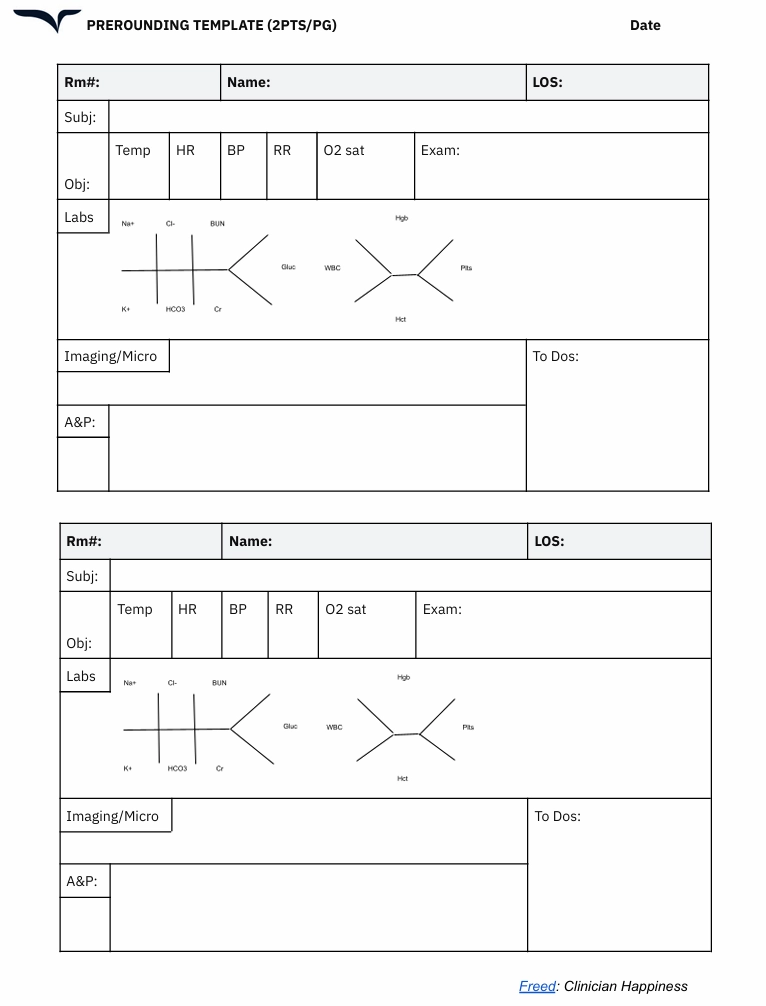
Breaking down the prerounding notes template
Prerounding notes are prepared by fellows and residents to summarize a patient’s condition before a clinician comes for their formal rounds.
The prerounding template comes in handy in hospital inpatient settings and gives clinicians a quick update. These notes serve as a bridge between comprehensive daily notes and point-of-care decision-making.
Here are the key sections in a prerounding notes template:
Patient identification
The notes include a few details specific to each patient, such as:
- Name: Include the patient’s name for quick identification.
- Room number (Rm#): Add the patient’s room or bed number to organize the notes in a sequence.
- Length of stay (LOS): Add information about the number of days or weeks a patient has been at the hospital to track the duration of hospitalization. This detail is crucial for some clinical decisions and discharge planning.
📌 Why patient identification matters
A hospital likely prepares hundreds of prerounding notes every day. Fellows and students can have key identifiers to organize your notes and access them easily when required.
SOAP format components
Prerounding notes also include elements from the SOAP framework. However, these are comparatively shorter than the actual SOAP notes.
Here’s what each part covers:
- Subjective: This captures patient-reported information about any overnight developments. You can update symptoms and add new ones.
- Objective: This includes a grid for tracking all vital signs. It also has space for physical exam results.
- Labs: This visual layout tracks lab values for different aspects, like glucose, kidney function, liver function, and more.
- Diagnostic: This includes radiology results and microbiology findings. It also mentions action items for follow-up tasks.
- A&P: This is a consolidated section for the clinical impression and future planning.
📌 Why the SOAP framework matters
The SOAP framework gives doctors a succinct overview of the patient’s health since their last interaction. It helps them anticipate patient needs before going on a round and prioritize cases that need urgent intervention.
Medical history form template
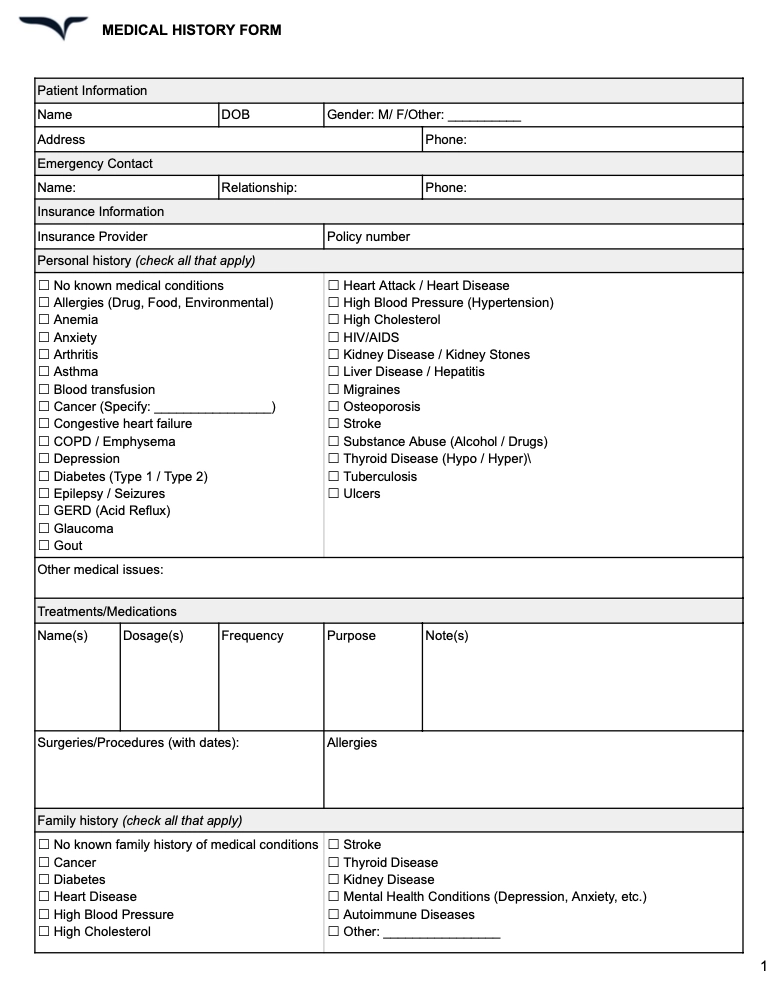
Breaking down the medical history form template
A medical history form — also called a client history form — gives you a structured way to capture a patient’s past and present health status. It helps you connect the dots between their symptoms, risk factors, and treatment needs.
Here are the key sections to include in your medical history form:
- Patient demographics: Start with the basics: name, age, date of birth, gender identity, and contact details. This ensures every form is tied to the correct patient record.
- Current medical concerns: Document the patient’s primary health concerns. Include details like symptom onset, duration, and any treatments attempted so far.
- Past medical history: Outline the patient’s previous diagnoses, surgeries, hospitalizations, and major illnesses. This provides helpful context for new symptoms or treatment responses.
- Medications and allergies: List all current medications, including dosages, supplements, and over-the-counter drugs. Include known allergies (especially medication allergies) to avoid potential risks.
- Family and social history: Document genetic risk factors, lifestyle habits, and social influences that may impact the patient’s health. This includes tobacco use, alcohol consumption, living situation, and employment status.
📌 Why medical history forms matter
A comprehensive client history form template gives you a complete view of the patient’s health — helping you make informed decisions and build personalized treatment plans. It also helps avoid redundant tests, medication conflicts, or overlooked risk factors.
Patient intake form template
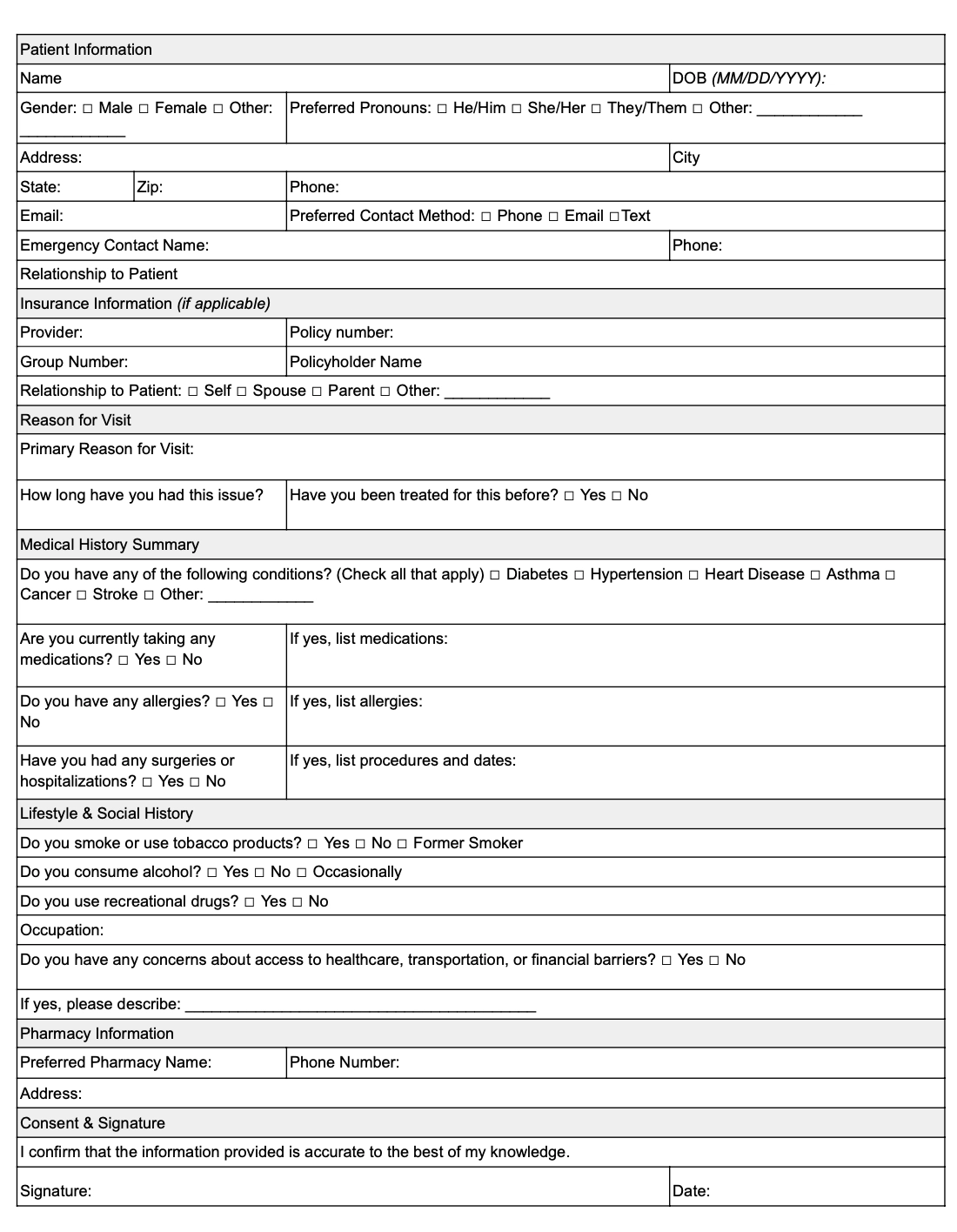
Breaking down the patient intake form template
An intake or new patient registration form helps gather key details before a visit, so you can enter the room prepared and informed. This helps you:
- Shorten the intake process
- Cut down on back-and-forth questions
- Focus more on the patient
Here are the key sections to include in your patient intake form:
- Patient information: Capture essential details like name, date of birth, contact information, and insurance details. This sets the stage for seamless administrative processing.
- Reason for visit: Ask patients to describe their primary concern or reason for seeking care. This gives you a clear starting point for the visit.
- Current medications and treatments: Document any ongoing treatments, prescriptions, or home remedies. Knowing what the patient is already doing allows you to build a treatment plan that fits their routine.
- Symptoms and concerns: Have patients describe their symptoms in their own words, including duration, triggers, and patterns.
- Relevant medical history: Include space for old and new patients to share past diagnoses, surgeries, or chronic conditions that may be important for their visit.
📌 Why the patient intake form matters
An intake form minimizes the time spent gathering background details during the visit. It equips you with key insights upfront so you can focus on clinical decisions and patient connection.
Nursing report form template

Breaking down the nursing report sheet template
A nursing report form (or patient report) streamlines patient handoffs —ensuring clear communication and better teamwork between shifts.
It highlights critical updates so the next clinician has everything they need to provide safe, effective care.
Here are the key sections to include in your nursing report form:
- Patient information: Start with the basics: patient name, room number, and primary diagnosis. This ensures each report is connected to the right patient.
- Current status: Document the patient’s mental status, vital signs, pain level, and any notable changes since the last report.
- Recent treatments and interventions: List recent medications, therapies, or procedures. Include timing to keep the next clinician informed on ongoing care.
- Upcoming care needs: Highlight pending tests, medication schedules, or interventions planned for the next shift. This ensures continuity of care without unnecessary guesswork.
- Safety and special considerations: Include critical information like fall risk, isolation status, or dietary restrictions to promote patient safety.
📌 Why the nursing report sheet matters
A clear, concise nursing report ensures your patient’s care continues seamlessly. By standardizing the information shared, you reduce the risk of errors and improve communication between teams.
How can doctor visit templates make your life easier
Still on the fence about using templates? Let's settle this.
Here's how our doctor visit templates will level up your clinical practice.
Standardization saves mental energy
Templates significantly slash the mental burden of documentation and free your brain for more high-value tasks.
Think of these templates as the GPS for your documentation journey. You don’t have to make that wrong turn at 'Was it diaphoresis or just regular sweating?’
When you don’t have to reinvent or rethink the note structure for every visit, you can dedicate more of your mental bandwidth to each patient. Save this mental energy for complex decision-making and meaningful patient interactions.
No missed information or miscommunication
A template visually reminds you to document essential elements and prevents gaps in medical documentation. It also reduces the risk of missing any data that could potentially affect the diagnosis.
This is particularly helpful for time-pressured clinicians. And it can eventually fast-track your paperwork process.
Make documentation more efficient
Well-designed templates follow the natural flow of clinical thinking. As a result, you can finish charting quickly and reduce the time spent on administrative tasks.
Standardized templates also help in recalling information quickly when you sit down to prepare medical notes for all the patients from the day.
Support billing needs
Thorough documentation supports accurate diagnoses, treatment plans, and care continuity — and ensures your work is properly recognized when it comes to reimbursement.
Our best tips for customizing doctor visit templates
Templates are not set in stone. They’re just starting points.
Customizing your templates isn’t just about better notes — it’s about building a system that feels effortless and intuitive.
When your doctor visit templates fit your workflow, charting becomes second nature — not a second job.
Specialty-specific versions
It’s easy to tailor these doctor visit templates to your specialty. Add or expand the sections you use most frequently in your charting process.
For example, if you’re a pulmonologist, add specific fields for the respiratory exam in the objective part of the SOAP notes template. Include fields like breath sounds, respiratory effort, and oxygen requirements. Similarly, orthopedists can add AROM/PROM fields (Active/Passive Range of Motion).
Clinical practice setting
Modify these templates based on your practice setting.
For outpatient settings, expand the Subjective section of the SOAP notes template. This will allow you to cover a patient’s longitudinal history in detail. If you work in the emergency department, focus on the Objective section and highlight vital sign trends.
Personal style-based design
Personalize these templates using your documentation preferences and speed up the paperwork process.
For example, color code different sections in the SOAP notes template for quicker navigation. You can also build a personal shorthand for frequently used phrases. Plus, you can create smart fields that auto-populate fields based on past data for recurring patients.
Patient-centered customizations
Improve these templates by adding patient-focused elements.
Create specific sections to document patient preferences for making more favorable treatment decisions. You can also add checkboxes to educate patients on common topics.
If you cater to a regional audience, add translations for all the phrases to build a more meaningful patient record.
More templates for your practice
Visit templates are one part of the intake flow. Start with a patient intake form template before the visit. Document ongoing care with our progress note template. Or browse more clinical notes templates by specialty.
Turn visit templates into notes that adapt to you
Doctor visit templates help create consistency. But real-world documentation evolves with your style, your specialty, and your workflow.
Freed’s AI medical scribe goes beyond pre-built templates. You can upload your own visit templates, customize sections exactly how you like them, or start from specialty-specific formats designed with real clinicians. Then, as you make edits, simply click Learn format — and Freed will apply those changes automatically to future notes.
Over time, your documentation becomes more accurate, more personalized, and more reflective of how you actually practice.
That means:
- Chart-ready notes that match your voice
- Formatting that adapts to your specialty
- Less repetitive editing
- Less mental load at the end of a long day
Freed is built to be intuitive from day one. Setup takes minutes. Customization is simple. And real human support is there if you need it.
Because better documentation isn’t about copying and pasting templates.It’s about having an AI medical scribe that adapts to you — so you can focus on your patients, not your charts.
Try Freed for free to see how templates can change your work for the better.
Disclaimer
This outline provides general guidance for creating doctor visit templates. Be sure to consult with legal and compliance professionals to confirm your form meets any relevant local, state/province, or national regulations, including HIPAA (in the U.S.) or other applicable data protection laws.

Doctor Visit Templates: Reclaim Your Time Beyond the Clinic
Table of Contents
Patient visits fly by in minutes.
But with the right templates, you can turn those endless notes into effortless records — saving time, reducing stress, and protecting your evenings.
You need templates to finish charting quickly, save mental energy, and win back time for your personal life.
Freed has created these doctor visit templates to help you keep up with the medical record, with way less time and stress.
Free doctor visit templates
Here's a break down of the free templates in this list:
- Standard SOAP note template
- Prerounding template
- Medical history form template
- Patient intake form template
- Nursing report sheet template
Want your visit templates to actually save you time, not just shift the work around?
You don’t have to start from scratch or constantly tweak static templates. With Freed, you can paste in or upload a real visit noteand it will generate a learned template based on how you already document.
Structured formats like SOAP notes work especially well. Every edit you make is captured by Freed’s Auto-Learn feature, so your templates evolve alongside your workflow.
| Visit template | Template alone | Template + Freed |
|---|---|---|
| SOAP note | You fill in each section manually after the visit — subjective from memory, objective from scratch, plan typed under time pressure. | Freed captures the full conversation and populates every SOAP section in real time. Review and sign, not reconstruct and write. |
| Prerounding note | Fellows and residents compile overnight updates manually before rounds — pulling from multiple sources under a tight morning window. | Freed generates a structured summary from prior notes and visit context, so the team walks into rounds already briefed. |
| Medical history form | Collected on paper at intake and re-entered into the EHR. Patients answer the same questions again at the visit. | Freed surfaces history context from the conversation and learns your format — returning patients aren’t asked what’s already on file. |
| Patient intake form | Filled out in the waiting room, handed to staff, and manually reviewed before the visit. Back-and-forth is common. | Digital intake through Freed’s workflow means clinicians walk in with context already organized — visit starts with care, not catch-up. |
| Nursing report sheet | Compiled manually at shift change from notes and memory. Critical updates can slip between nurses under time pressure. | Freed’s structured notes give the incoming nurse a complete, accurate handoff summary — nothing reconstructed, nothing missed. |
| Specialty customization | Requires manual edits to every template — adding pulm fields, AROM/PROM sections, or ED-specific vitals grids by hand. | Upload a sample note from your specialty and Freed’s Instant Templates build a learned template immediately. No building from scratch. |
| Note style and voice | Template structure stays consistent, but phrasing varies visit to visit. Your style has to be manually re-applied every time. | Auto-learn picks up your edits and applies them going forward — structure and voice stay consistent without extra effort. |
| End-of-day charting | Notes pile up when the schedule runs over. Evenings and weekends absorb the overflow. | Notes are ready within minutes of each visit. Clinicians save an average of 5+ hours per week — evenings back by default. |
Explore Freed templates — no credit card required
SOAP note template
Breaking down the SOAP notes template
SOAP notes offer a structured format to capture patient conversations for the medical record.
These notes cover a patient’s concerns and your observations, followed by an objective assessment of their condition and analysis.
Let’s look at all the key elements of our free SOAP note template.
Subjective section
The Subjective part of the template documents insights from the patient’s perspective.
This section covers three main details:
- Chief complaint: Note down the patient’s primary concern in their own words. This point sets the context for the entire patient encounter.
- History of present illness: You also need to document the patient’s past experiences with this illness. Cover details like onset, duration, aggravating and relieving factors, severity, and more.
- Medical context: Add information to establish medical context about this condition. This part includes past medical history, current medication, allergies, and family and social history.
📌 Why the Subjective matters
Capturing the patient’s story builds trust, ensures their concerns are heard, and guides your diagnostic thinking. This context anchors your assessment and treatment decisions.
Objective section
The Objective section includes the clinician’s observations and findings through tests or lab reports.
Here are the five main points to cover in this part:
- GA (General Appearance): This covers insights about the patient's physical state—their hygiene, mental well-being, demeanor, and more. It creates a baseline for future visits and offers helpful context to interpret other clinical findings.
- PE (Physical Examination): This part includes notes from a physical examination to confirm or rule out a patient’s concerns. It can also mention issues that the patient hasn’t reported.
- Vital signs: This part measures the patient’s vital signs:
- Temperature
- Heart Rate (HR)
- Blood Pressure (BP)
- Respiratory Rate (RR)
- Oxygen Saturation (O2 Sat)
- System-specific exam: This part includes findings from multiple exams, such as:
- HEENT: Head, Eyes, Ears, Nose, Throat examination
- Cardio/Pulm: Cardiovascular and pulmonary results
- Abdomen: Abdominal examination results
- Musculoskeletal: Results related to muscles, bones, and joints
- Neuro: Neurological examination results
- Diagnostic information: The final part covers insights from lab test reports and imaging or microbiology results. You can also add pending tests required for additional information.
📌 Why the Objective matters
The Objective section consolidates factual insights about the patient to create an evidence-based treatment plan. Clinicians establish a baseline to track the patient’s progression over the course of the treatment. Plus, the objective findings help with care coordination between providers.
Assessment & Plan (A&P) section
The final section documents the clinician’s diagnosis based on the available information. It also shares the clinical reasoning behind the diagnosis along with a treatment plan for the condition.
Here’s what you should include in this part:
- Primary diagnosis: Share your main diagnosis (or "problem,") based on an analysis of the patient’s symptoms and tests. This is either a confirmed or most likely diagnosis.
- Differential diagnosis: If you’re unsure of the primary diagnosis, you can highlight other possible diagnoses in cases of doubt.
- Clinical reasoning: Jot down your thought process behind the diagnostic conclusions shared above. This part includes the clinician’s rationale behind their diagnosis.
- Treatment plan: Highlight specific procedures and interventions that would be suitable for the patient. You can also add the prescribed medication for their condition.
- Follow-up instructions: Talk about the timeline for patient revisits for further assessment.
- Patient education: Share helpful information/resources to help the patient understand their condition and treatment.
📌 Why assessment and plan matter
The A&P section highlights the clinician’s decision-making process with the rationale behind the diagnosis and treatment. It also provides clear instructions to improve patient outcomes post-treatment.
Prerounding template
Breaking down the prerounding notes template
Prerounding notes are prepared by fellows and residents to summarize a patient’s condition before a clinician comes for their formal rounds.
The prerounding template comes in handy in hospital inpatient settings and gives clinicians a quick update. These notes serve as a bridge between comprehensive daily notes and point-of-care decision-making.
Here are the key sections in a prerounding notes template:
Patient identification
The notes include a few details specific to each patient, such as:
- Name: Include the patient’s name for quick identification.
- Room number (Rm#): Add the patient’s room or bed number to organize the notes in a sequence.
- Length of stay (LOS): Add information about the number of days or weeks a patient has been at the hospital to track the duration of hospitalization. This detail is crucial for some clinical decisions and discharge planning.
📌 Why patient identification matters
A hospital likely prepares hundreds of prerounding notes every day. Fellows and students can have key identifiers to organize your notes and access them easily when required.
SOAP format components
Prerounding notes also include elements from the SOAP framework. However, these are comparatively shorter than the actual SOAP notes.
Here’s what each part covers:
- Subjective: This captures patient-reported information about any overnight developments. You can update symptoms and add new ones.
- Objective: This includes a grid for tracking all vital signs. It also has space for physical exam results.
- Labs: This visual layout tracks lab values for different aspects, like glucose, kidney function, liver function, and more.
- Diagnostic: This includes radiology results and microbiology findings. It also mentions action items for follow-up tasks.
- A&P: This is a consolidated section for the clinical impression and future planning.
📌 Why the SOAP framework matters
The SOAP framework gives doctors a succinct overview of the patient’s health since their last interaction. It helps them anticipate patient needs before going on a round and prioritize cases that need urgent intervention.
Medical history form template
Breaking down the medical history form template
A medical history form — also called a client history form — gives you a structured way to capture a patient’s past and present health status. It helps you connect the dots between their symptoms, risk factors, and treatment needs.
Here are the key sections to include in your medical history form:
- Patient demographics: Start with the basics: name, age, date of birth, gender identity, and contact details. This ensures every form is tied to the correct patient record.
- Current medical concerns: Document the patient’s primary health concerns. Include details like symptom onset, duration, and any treatments attempted so far.
- Past medical history: Outline the patient’s previous diagnoses, surgeries, hospitalizations, and major illnesses. This provides helpful context for new symptoms or treatment responses.
- Medications and allergies: List all current medications, including dosages, supplements, and over-the-counter drugs. Include known allergies (especially medication allergies) to avoid potential risks.
- Family and social history: Document genetic risk factors, lifestyle habits, and social influences that may impact the patient’s health. This includes tobacco use, alcohol consumption, living situation, and employment status.
📌 Why medical history forms matter
A comprehensive client history form template gives you a complete view of the patient’s health — helping you make informed decisions and build personalized treatment plans. It also helps avoid redundant tests, medication conflicts, or overlooked risk factors.
Patient intake form template
Breaking down the patient intake form template
An intake or new patient registration form helps gather key details before a visit, so you can enter the room prepared and informed. This helps you:
- Shorten the intake process
- Cut down on back-and-forth questions
- Focus more on the patient
Here are the key sections to include in your patient intake form:
- Patient information: Capture essential details like name, date of birth, contact information, and insurance details. This sets the stage for seamless administrative processing.
- Reason for visit: Ask patients to describe their primary concern or reason for seeking care. This gives you a clear starting point for the visit.
- Current medications and treatments: Document any ongoing treatments, prescriptions, or home remedies. Knowing what the patient is already doing allows you to build a treatment plan that fits their routine.
- Symptoms and concerns: Have patients describe their symptoms in their own words, including duration, triggers, and patterns.
- Relevant medical history: Include space for old and new patients to share past diagnoses, surgeries, or chronic conditions that may be important for their visit.
📌 Why the patient intake form matters
An intake form minimizes the time spent gathering background details during the visit. It equips you with key insights upfront so you can focus on clinical decisions and patient connection.
Nursing report form template
Breaking down the nursing report sheet template
A nursing report form (or patient report) streamlines patient handoffs —ensuring clear communication and better teamwork between shifts.
It highlights critical updates so the next clinician has everything they need to provide safe, effective care.
Here are the key sections to include in your nursing report form:
- Patient information: Start with the basics: patient name, room number, and primary diagnosis. This ensures each report is connected to the right patient.
- Current status: Document the patient’s mental status, vital signs, pain level, and any notable changes since the last report.
- Recent treatments and interventions: List recent medications, therapies, or procedures. Include timing to keep the next clinician informed on ongoing care.
- Upcoming care needs: Highlight pending tests, medication schedules, or interventions planned for the next shift. This ensures continuity of care without unnecessary guesswork.
- Safety and special considerations: Include critical information like fall risk, isolation status, or dietary restrictions to promote patient safety.
📌 Why the nursing report sheet matters
A clear, concise nursing report ensures your patient’s care continues seamlessly. By standardizing the information shared, you reduce the risk of errors and improve communication between teams.
How can doctor visit templates make your life easier
Still on the fence about using templates? Let's settle this.
Here's how our doctor visit templates will level up your clinical practice.
Standardization saves mental energy
Templates significantly slash the mental burden of documentation and free your brain for more high-value tasks.
Think of these templates as the GPS for your documentation journey. You don’t have to make that wrong turn at 'Was it diaphoresis or just regular sweating?’
When you don’t have to reinvent or rethink the note structure for every visit, you can dedicate more of your mental bandwidth to each patient. Save this mental energy for complex decision-making and meaningful patient interactions.
No missed information or miscommunication
A template visually reminds you to document essential elements and prevents gaps in medical documentation. It also reduces the risk of missing any data that could potentially affect the diagnosis.
This is particularly helpful for time-pressured clinicians. And it can eventually fast-track your paperwork process.
Make documentation more efficient
Well-designed templates follow the natural flow of clinical thinking. As a result, you can finish charting quickly and reduce the time spent on administrative tasks.
Standardized templates also help in recalling information quickly when you sit down to prepare medical notes for all the patients from the day.
Support billing needs
Thorough documentation supports accurate diagnoses, treatment plans, and care continuity — and ensures your work is properly recognized when it comes to reimbursement.
Our best tips for customizing doctor visit templates
Templates are not set in stone. They’re just starting points.
Customizing your templates isn’t just about better notes — it’s about building a system that feels effortless and intuitive.
When your doctor visit templates fit your workflow, charting becomes second nature — not a second job.
Specialty-specific versions
It’s easy to tailor these doctor visit templates to your specialty. Add or expand the sections you use most frequently in your charting process.
For example, if you’re a pulmonologist, add specific fields for the respiratory exam in the objective part of the SOAP notes template. Include fields like breath sounds, respiratory effort, and oxygen requirements. Similarly, orthopedists can add AROM/PROM fields (Active/Passive Range of Motion).
Clinical practice setting
Modify these templates based on your practice setting.
For outpatient settings, expand the Subjective section of the SOAP notes template. This will allow you to cover a patient’s longitudinal history in detail. If you work in the emergency department, focus on the Objective section and highlight vital sign trends.
Personal style-based design
Personalize these templates using your documentation preferences and speed up the paperwork process.
For example, color code different sections in the SOAP notes template for quicker navigation. You can also build a personal shorthand for frequently used phrases. Plus, you can create smart fields that auto-populate fields based on past data for recurring patients.
Patient-centered customizations
Improve these templates by adding patient-focused elements.
Create specific sections to document patient preferences for making more favorable treatment decisions. You can also add checkboxes to educate patients on common topics.
If you cater to a regional audience, add translations for all the phrases to build a more meaningful patient record.
More templates for your practice
Visit templates are one part of the intake flow. Start with a patient intake form template before the visit. Document ongoing care with our progress note template. Or browse more clinical notes templates by specialty.
Turn visit templates into notes that adapt to you
Doctor visit templates help create consistency. But real-world documentation evolves with your style, your specialty, and your workflow.
Freed’s AI medical scribe goes beyond pre-built templates. You can upload your own visit templates, customize sections exactly how you like them, or start from specialty-specific formats designed with real clinicians. Then, as you make edits, simply click Learn format — and Freed will apply those changes automatically to future notes.
Over time, your documentation becomes more accurate, more personalized, and more reflective of how you actually practice.
That means:
- Chart-ready notes that match your voice
- Formatting that adapts to your specialty
- Less repetitive editing
- Less mental load at the end of a long day
Freed is built to be intuitive from day one. Setup takes minutes. Customization is simple. And real human support is there if you need it.
Because better documentation isn’t about copying and pasting templates.It’s about having an AI medical scribe that adapts to you — so you can focus on your patients, not your charts.
Try Freed for free to see how templates can change your work for the better.
Disclaimer
This outline provides general guidance for creating doctor visit templates. Be sure to consult with legal and compliance professionals to confirm your form meets any relevant local, state/province, or national regulations, including HIPAA (in the U.S.) or other applicable data protection laws.
FAQs
Frequently asked questions from clinicians and medical practitioners.

What’s the difference between an online template and a paper form?

How can an organization improve teamwork using online templates?
What’s the best way to transition from paper form templates to online templates?
What is a patient registration form, and how does it improve clinical workflows?
How can a fellow use a patient registration form to improve documentation?
Can a patient registration form template improve career advocacy for clinicians?
.avif)
Related content
Free yourself for better things


548 Market Street, PMB 95301
San Francisco, CA 94104
Specialties
Compliance & Security
Our technology is HIPAA-compliant, uses industry best practices, and doesn’t store patient recordings.