


Freed: The AI Scribe for Tebra/Kareo
Tebra and Freed are built for the same kind of clinician — independent, patient-focused, and running a practice without layers of IT or administrative overhead.
Tebra gives small and midsized clinics a flexible EHR to manage scheduling, billing, and charts.
Freed’s AI scribe complements that workflow by handling one of the most time-consuming parts of the day: clinical documentation.
Instead of typing notes after hours or wrestling with rigid templates, clinicians use Freed to capture visits naturally and generate chart-ready notes that fit directly into Tebra.
Freed works alongside Tebra using a lightweight Chrome extension, so clinicians get the benefits of an EHR integration without complex setup, long timelines, or locked-in workflows.
What is Tebra, and who is it built for?
Tebra (formerly Kareo) is an EHR and practice management platform designed primarily for small and midsized outpatient practices.
Typically, these independent clinics want a single system for scheduling, billing, patient communication, and clinical documentation — without the overhead of enterprise EHRs.
Clinicians who use Tebra often include:
- Family medicine and primary care providers
- OB/GYNs and women’s health clinics
- Pediatrics practices
- Mental health and behavioral health providers
- Small specialty clinics running lean teams
For these practices, the EHR has to be flexible and affordable — but documentation can still be one of the biggest daily pain points. Notes take time, editing piles up after hours, and switching between tools breaks focus during patient visits.
That’s where Freed comes in.
How Freed integrates with Tebra
Freed is an AI medical scribe designed to work with your existing workflow. For Tebra users, that means no heavy setup or waiting weeks for an EHR integration.
Freed works alongside Tebra using a Chrome extension that opens directly on top of your EHR.
You record your visit, review your note, and send it into Tebra — all without leaving the page you’re already working in.
This gives you the simplicity of an API integration PLUS the flexibility of an EHR-agnostic tool.
💡 Learn how to use Freed + Tebra in our help center.
Get started with Freed + Tebra in minutes
Getting started with Freed is intentionally lightweight — especially for clinicians in small practices.
Here’s how it works:
1. Create your Freed account
Sign up and access your personal workspace. No credit card is required to try it.

💡Learn how to get started with Freed.
2. Install the Chrome extension
Download and pin. The extension allows Freed to live on top of your Tebra browser tab, so everything stays in one place.

3. Capture your patient visit
Record in-person or virtual visits while you talk naturally with your patient. You can switch tabs in your EHR and Freed will continue to capture your note.

4. Review and finalize your note
Your note is ready seconds after the visit ends — structured and organized. Upload your own templates or click Learn format to train a learned template based on your edits.

💡Learn how to edit your note in Freed.
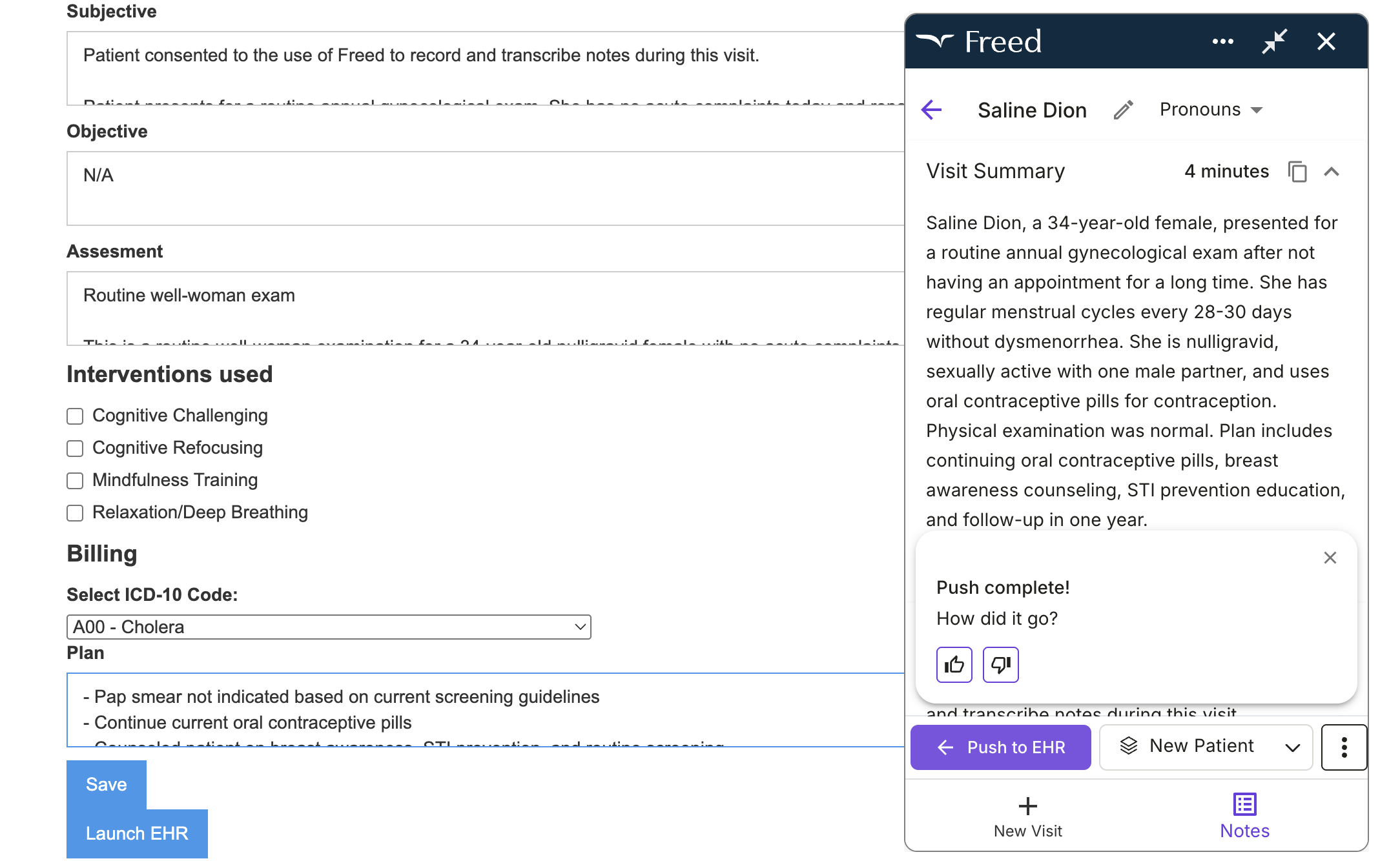
5. Send the note into Tebra
The extension will map your note to the appropriate fields in Tebra. Just click
Big benefits of using Freed for Tebra
Freed opens directly on top of your Tebra account
One of the biggest advantages for Tebra users is that Freed runs in the same window as your EHR.
Just launch the Freed extension when you’re in your Tebra browser. Freed shows up as a small overlay on top of your EHR interface. That means:
- No constant tab switching
- No copying text into temporary documents
- No breaking focus during clinic hours
From that overlay, you can:
- Make prompted edits across the entire note
- Adjust note length or structure instantly
- Review documentation without leaving Tebra
And Freed rights right into the flow of your day.
💡 Learn more about Freed's EHR push.
Customize notes to match your style — and let Freed learn it
Every clinician documents a little differently. Freed is built around that reality.
With Freed, you can:
- Review pre-visit summaries
- Upload your own templates
- Edit individual notes with advanced features like prompted edits
- Generate ICD-10 codes
- Train a learned template that adapts future notes to your edits
Freed notes map directly into the right Tebra fields
Once your note is ready, Freed helps move it where it belongs.
Using the Chrome Extension, your documentation maps into the appropriate sections of your Tebra chart — reducing manual copy-paste and cleanup work.
The result:
- Cleaner charts
- Fewer after-hours edits
- Notes that are ready to review and sign
You stay in control the entire time, with the ability to make final adjustments before anything is saved.
An EHR integration — and an integration alternative
Freed gives Tebra users the benefits of an EHR integration without the usual tradeoffs.
Instead of long implementation timelines and an IT-heavy set up, you can get started in a day, with the flexibility you need across specialties, languages, and locations.
Built for small and midsized clinics using Tebra
If you’re already using Tebra, you don’t need another system — you need documentation that finally keeps up with your day.
Freed works alongside Tebra to take charting off your plate. Notes are captured during the visit, customized to your style, and placed directly into the right fields.
Want to see it in action? Try Freed for free.


Table of Contents
Tebra and Freed are built for the same kind of clinician — independent, patient-focused, and running a practice without layers of IT or administrative overhead.
Tebra gives small and midsized clinics a flexible EHR to manage scheduling, billing, and charts.
Freed’s AI scribe complements that workflow by handling one of the most time-consuming parts of the day: clinical documentation.
Instead of typing notes after hours or wrestling with rigid templates, clinicians use Freed to capture visits naturally and generate chart-ready notes that fit directly into Tebra.
Freed works alongside Tebra using a lightweight Chrome extension, so clinicians get the benefits of an EHR integration without complex setup, long timelines, or locked-in workflows.
What is Tebra, and who is it built for?
Tebra (formerly Kareo) is an EHR and practice management platform designed primarily for small and midsized outpatient practices.
Typically, these independent clinics want a single system for scheduling, billing, patient communication, and clinical documentation — without the overhead of enterprise EHRs.
Clinicians who use Tebra often include:
- Family medicine and primary care providers
- OB/GYNs and women’s health clinics
- Pediatrics practices
- Mental health and behavioral health providers
- Small specialty clinics running lean teams
For these practices, the EHR has to be flexible and affordable — but documentation can still be one of the biggest daily pain points. Notes take time, editing piles up after hours, and switching between tools breaks focus during patient visits.
That’s where Freed comes in.
How Freed integrates with Tebra
Freed is an AI medical scribe designed to work with your existing workflow. For Tebra users, that means no heavy setup or waiting weeks for an EHR integration.
Freed works alongside Tebra using a Chrome extension that opens directly on top of your EHR.
You record your visit, review your note, and send it into Tebra — all without leaving the page you’re already working in.
This gives you the simplicity of an API integration PLUS the flexibility of an EHR-agnostic tool.
💡 Learn how to use Freed + Tebra in our help center.
Get started with Freed + Tebra in minutes
Getting started with Freed is intentionally lightweight — especially for clinicians in small practices.
Here’s how it works:
1. Create your Freed account
Sign up and access your personal workspace. No credit card is required to try it.
💡Learn how to get started with Freed.
2. Install the Chrome extension
Download and pin. The extension allows Freed to live on top of your Tebra browser tab, so everything stays in one place.
3. Capture your patient visit
Record in-person or virtual visits while you talk naturally with your patient. You can switch tabs in your EHR and Freed will continue to capture your note.
4. Review and finalize your note
Your note is ready seconds after the visit ends — structured and organized. Upload your own templates or click Learn format to train a learned template based on your edits.
💡Learn how to edit your note in Freed.
5. Send the note into Tebra
The extension will map your note to the appropriate fields in Tebra. Just click
Big benefits of using Freed for Tebra
Freed opens directly on top of your Tebra account
One of the biggest advantages for Tebra users is that Freed runs in the same window as your EHR.
Just launch the Freed extension when you’re in your Tebra browser. Freed shows up as a small overlay on top of your EHR interface. That means:
- No constant tab switching
- No copying text into temporary documents
- No breaking focus during clinic hours
From that overlay, you can:
- Make prompted edits across the entire note
- Adjust note length or structure instantly
- Review documentation without leaving Tebra
And Freed rights right into the flow of your day.
💡 Learn more about Freed's EHR push.
Customize notes to match your style — and let Freed learn it
Every clinician documents a little differently. Freed is built around that reality.
With Freed, you can:
- Review pre-visit summaries
- Upload your own templates
- Edit individual notes with advanced features like prompted edits
- Generate ICD-10 codes
- Train a learned template that adapts future notes to your edits
Freed notes map directly into the right Tebra fields
Once your note is ready, Freed helps move it where it belongs.
Using the Chrome Extension, your documentation maps into the appropriate sections of your Tebra chart — reducing manual copy-paste and cleanup work.
The result:
- Cleaner charts
- Fewer after-hours edits
- Notes that are ready to review and sign
You stay in control the entire time, with the ability to make final adjustments before anything is saved.
An EHR integration — and an integration alternative
Freed gives Tebra users the benefits of an EHR integration without the usual tradeoffs.
Instead of long implementation timelines and an IT-heavy set up, you can get started in a day, with the flexibility you need across specialties, languages, and locations.
Built for small and midsized clinics using Tebra
If you’re already using Tebra, you don’t need another system — you need documentation that finally keeps up with your day.
Freed works alongside Tebra to take charting off your plate. Notes are captured during the visit, customized to your style, and placed directly into the right fields.
Want to see it in action? Try Freed for free.
FAQs
Frequently asked questions from clinicians and medical practitioners.
Related content
Free yourself for better things


548 Market Street, PMB 95301
San Francisco, CA 94104
Specialties
Compliance & Security
Our technology is HIPAA-compliant, uses industry best practices, and doesn’t store patient recordings.



