


Freed’s AI Scribe for OptiMantra: Documentation for Relationship-Based Care
OptiMantra is built for integrative, functional, concierge, and membership-based practices — with tools for scheduling, charting, billing, telehealth, and patient engagement in one system.
In many of these practices, visits are longer. Conversations go deeper. Documentation can become more narrative and nuanced.
That’s where Freed comes in.
Freed’s AI scribe works alongside OptiMantra to help clinicians turn detailed conversations into structured documentation — without sacrificing time, presence, or energy.
Designed for longer, relationship-driven visits
Integrative and concierge practices often operate differently than traditional volume-based care.
Appointments may include:
- Comprehensive intake histories
- Lifestyle and nutrition discussions
- Functional lab reviews
- Longitudinal care planning
- Preventive and wellness strategies
These visits generate rich clinical detail — and writing them up can take longer than the visit itself.
Freed helps organize that information into structured notes, reducing the friction between the conversation and the chart.
💡Learn why Freed is the perfect match for integrative medicine
A browser workflow that fits into OptiMantra
Freed uses a browser-based model that works alongside OptiMantra without requiring system-level changes.
Here’s how it works:
- Capture your visit using Freed
- Review and refine your note — with customizable templates, and an AI clinician assistant for clinical questions
- Use EHR push to transfer the note into OptiMantra from your browser
It's a more efficient way to move from session to completed chart — without heavy EHR integrations.
"You're saving my life. I used to think about quitting all the time because it's so overwhelming. Your tool has been an amazing help." — Dr. Nancy Lonsdorf
How to get started with Freed and OptiMantra
Getting started is straightforward.
Step 1: Create your Freed account and download the extension

Sign up and access your secure dashboard. Then download and pin the Chrome extension. This allows Freed to operate alongside OptiMantra within your browser.
Step 2: Capture your visit
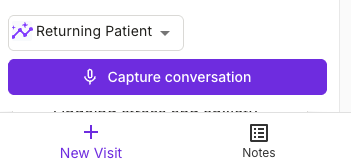
Open your EHR. Use Freed during in-person or telehealth visits to record and structure clinical discussions.
Step 4: Refine your note
Review the generated draft, make edits, and adjust formatting. In Freed, you can upload your own templates, train Freed based on your edits with a learned template, and ask our AI clinician assistant patient questions and guideline insights.

Step 4: Push to OptiMantra

Transfer the note into OptiMantra using EHR push directly from your browser.
Then finalize your chart and move on with your day.
💡Learn more about Freed's EHR push — our integration alternative
Why OptiMantra clinicians choose Freed
In practices where relationships matter deeply, documentation can't take up all of your time. Here's why clinicians are choosing Freed.
Designed for longer, relationship-driven visits
Integrative and concierge practices often operate differently than traditional volume-based care.
Appointments may include:
- Comprehensive intake histories
- Functional lab reviews
- Longitudinal care planning
- Preventive and wellness strategies
These visits generate rich clinical detail — and writing them up can take longer than the visit itself.
Freed helps organize that information into structured notes, reducing the friction between the conversation and the chart.
Documentation that adapts to your care model
OptiMantra supports diverse practice types — from direct primary care to functional medicine to concierge models.
Freed complements that flexibility by allowing you to:
- Upload your own note templates
- Train a personalized Freed learned template
- Adjust documentation structure and detail
- Maintain consistency across providers
Over time, documentation aligns more closely with your practice’s philosophy and standards — without repetitive manual formatting.
Built for modern, independent practices
OptiMantra is frequently chosen by independent clinics that value autonomy and personalized care.
Freed supports those same teams by being:
- Easy to implement without IT complexity
- Flexible across specialties and visit types
- Backed by responsive, human support
Freed for OptiMantra clinicians
If you’re using OptiMantra and want documentation that aligns with your integrative, patient-centered model, Freed was built to support you.
Less friction. More time for the care that sets your practice apart.
Learn more about getting started with Freed.

Freed’s AI Scribe for OptiMantra: Documentation for Relationship-Based Care

Table of Contents
OptiMantra is built for integrative, functional, concierge, and membership-based practices — with tools for scheduling, charting, billing, telehealth, and patient engagement in one system.
In many of these practices, visits are longer. Conversations go deeper. Documentation can become more narrative and nuanced.
That’s where Freed comes in.
Freed’s AI scribe works alongside OptiMantra to help clinicians turn detailed conversations into structured documentation — without sacrificing time, presence, or energy.
Designed for longer, relationship-driven visits
Integrative and concierge practices often operate differently than traditional volume-based care.
Appointments may include:
- Comprehensive intake histories
- Lifestyle and nutrition discussions
- Functional lab reviews
- Longitudinal care planning
- Preventive and wellness strategies
These visits generate rich clinical detail — and writing them up can take longer than the visit itself.
Freed helps organize that information into structured notes, reducing the friction between the conversation and the chart.
💡Learn why Freed is the perfect match for integrative medicine
A browser workflow that fits into OptiMantra
Freed uses a browser-based model that works alongside OptiMantra without requiring system-level changes.
Here’s how it works:
- Capture your visit using Freed
- Review and refine your note — with customizable templates, and an AI clinician assistant for clinical questions
- Use EHR push to transfer the note into OptiMantra from your browser
It's a more efficient way to move from session to completed chart — without heavy EHR integrations.
"You're saving my life. I used to think about quitting all the time because it's so overwhelming. Your tool has been an amazing help." — Dr. Nancy Lonsdorf
How to get started with Freed and OptiMantra
Getting started is straightforward.
Step 1: Create your Freed account and download the extension
Sign up and access your secure dashboard. Then download and pin the Chrome extension. This allows Freed to operate alongside OptiMantra within your browser.
Step 2: Capture your visit
Open your EHR. Use Freed during in-person or telehealth visits to record and structure clinical discussions.
Step 4: Refine your note
Review the generated draft, make edits, and adjust formatting. In Freed, you can upload your own templates, train Freed based on your edits with a learned template, and ask our AI clinician assistant patient questions and guideline insights.
Step 4: Push to OptiMantra
Transfer the note into OptiMantra using EHR push directly from your browser.
Then finalize your chart and move on with your day.
💡Learn more about Freed's EHR push — our integration alternative
Why OptiMantra clinicians choose Freed
In practices where relationships matter deeply, documentation can't take up all of your time. Here's why clinicians are choosing Freed.
Designed for longer, relationship-driven visits
Integrative and concierge practices often operate differently than traditional volume-based care.
Appointments may include:
- Comprehensive intake histories
- Functional lab reviews
- Longitudinal care planning
- Preventive and wellness strategies
These visits generate rich clinical detail — and writing them up can take longer than the visit itself.
Freed helps organize that information into structured notes, reducing the friction between the conversation and the chart.
Documentation that adapts to your care model
OptiMantra supports diverse practice types — from direct primary care to functional medicine to concierge models.
Freed complements that flexibility by allowing you to:
- Upload your own note templates
- Train a personalized Freed learned template
- Adjust documentation structure and detail
- Maintain consistency across providers
Over time, documentation aligns more closely with your practice’s philosophy and standards — without repetitive manual formatting.
Built for modern, independent practices
OptiMantra is frequently chosen by independent clinics that value autonomy and personalized care.
Freed supports those same teams by being:
- Easy to implement without IT complexity
- Flexible across specialties and visit types
- Backed by responsive, human support
Freed for OptiMantra clinicians
If you’re using OptiMantra and want documentation that aligns with your integrative, patient-centered model, Freed was built to support you.
Less friction. More time for the care that sets your practice apart.
Learn more about getting started with Freed.
FAQs
Frequently asked questions from clinicians and medical practitioners.

Do I need IT support to set up EHR push?

Does EHR push work with my specific EHR?
Which EHR systems are compatible with Freed?
Can I customize how my notes appear in my EHR?
How does Freed's EHR integration protect patient information?
How can I get started with Freed?
Related content
Free yourself for better things


548 Market Street, PMB 95301
San Francisco, CA 94104
Specialties
Compliance & Security
Our technology is HIPAA-compliant, uses industry best practices, and doesn’t store patient recordings.



