


Freed vs. Tali: Comparing the Best AI Scribes [2026]
Choosing the Right AI Medical Scribe as a Clinician
Artificial Intelligence (AI) Medical Scribes are truly a game changer for clinicians. I’m talking about cutting documentation time in half without sacrificing quality notes. If you’re not currently using one in your practice, keep reading.
Many clinicians have experienced the constant stress of trying to stay on top of charts through back-to-back patients. Late nights at the clinic, charting at home, and never really feeling caught up — it’s exhausting.
To reclaim my time and restore some work-life balance, I started testing AI medical scribes—digital tools designed to automate and streamline clinical documentation.
Two top contenders in this space are Freed AI Medical Scribe and Tali AI Medical Scribe. Both offer features aimed at saving time, improving charting efficiency, and reducing burnout. But after an in-depth comparison, one stood out as the best solution for nurse practitioners.
Let’s dive into what I found when comparing Freed AI Medical Scribe and Tali AI Medical Scribe.
💡Considering another AI scribe that's in your EHR? See how Freed compares to EHR-native AI scribes
What I tested & why
I approached this comparison by testing Freed AI Medical Scribe and Tali AI Medical Scribe in real clinic scenarios (I work in primary care), and evaluating how they performed in areas that truly matter to busy providers:
- Does it save time during patient visits and between appointments?
- How easy is it to set up and integrate with existing systems?
- Is it customizable and adaptable to each provider’s style?
- Can it scale with a growing team?
- Are the trial and pricing plans accessible?
I wanted to compare not just the tech, but that ways in which each helped me chart faster, without sacrificing note quality.
Freed AI medical scribe: Personalization And long-term growth
After testing both options, Freed offered more in terms of adaptability, personalization, and day-to-day clinical ease. If you’re a clinician looking for a smarter, more sustainable way to chart, Freed delivers.
Here’s why Freed stands out:
1. Customizable + learned templates that evolve with you
This is where Freed truly shines.
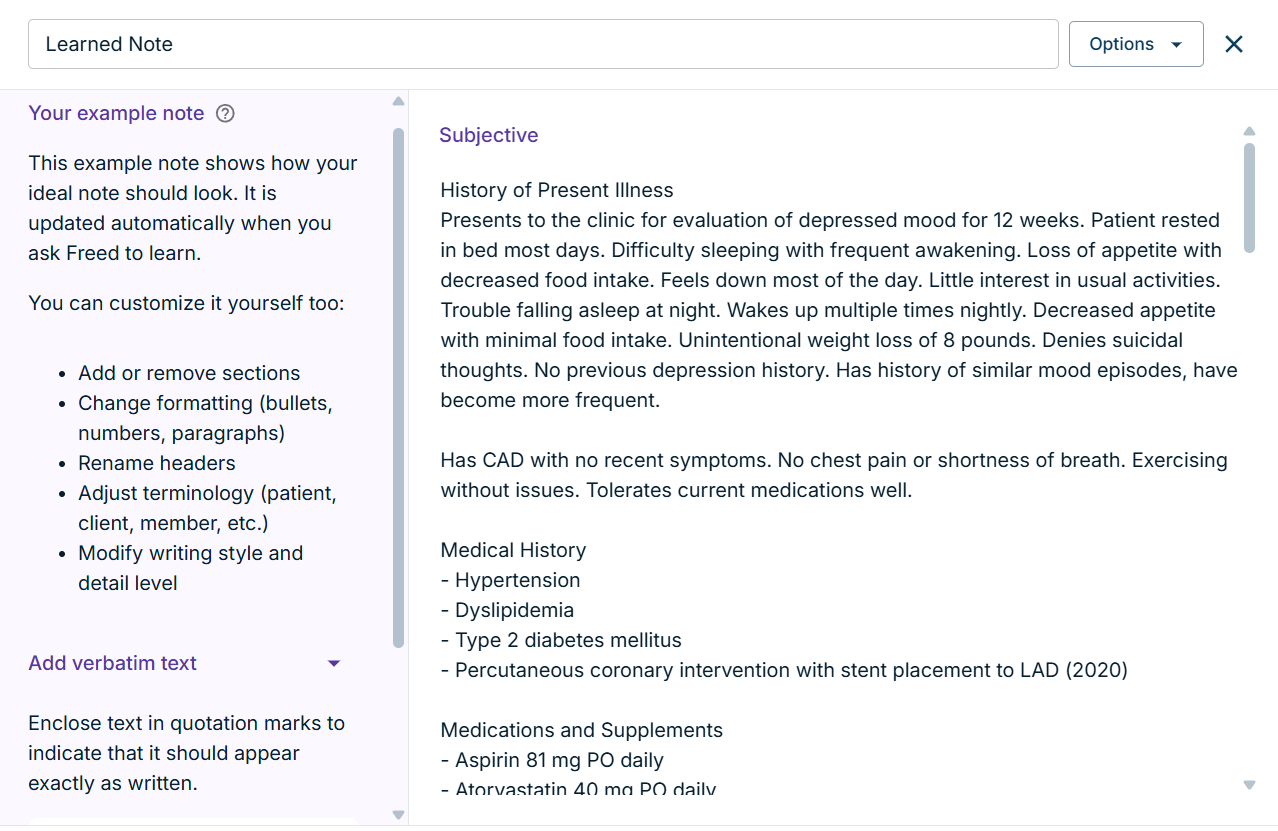
Unlike Tali's more static templates, Freed allows you to customize templates for different visit types, specialties, and personal preferences. You can fine-tune sections like HPI, ROS, and Plan with just a few clicks. (Watch this video to learn how to create customizable templates within Freed).
Freed also learns your style over time. The AI adapts to your language, formatting, and phrasing the more you use it — producing increasingly accurate, personalized notes in your own voice. Try the “Learned Templates” for yourself!
2. One-click EHR integration
Freed’s EHR push feature allows you to send finalized notes directly into your browser-based EHR with just a couple of clicks. No IT assistance is needed. Which means you don’t have to beg your clinic manager to use the technology.
Freed AI medical scribe is also affordable, and clinicians can begin using it right away. There are no delays, no downtime, and no headaches for time-strapped clinicians. Tali on the other hand offers EHR integrations that may require tech support.
3. Supports multiple languages + built-in english translation
Have a multilingual patient population? Freed’s scribe tool supports multiple languages and automatically translates the final note into fluent English.
Your documentation is accurate and consistent — no matter what language the visit was conducted in.
4. Referral letters & patient communication tools
Freed is also working on adding referral letters and additional patient letters for providers handling a high volume of specialist referrals or patient updates. I like how Freed is committed to evolving beyond a scribe into a full documentation solution.
5. Designed for individual clinicians and growing teams
Freed offers a thoughtful setup for both solos and growing groups:
- Each clinician gets their own account, and their notes are saved separately.
- You can easily share templates across the team to create uniform workflows.
- Plans are structured to grow with your team, so you’re not locked into a one-size-fits-all solution.
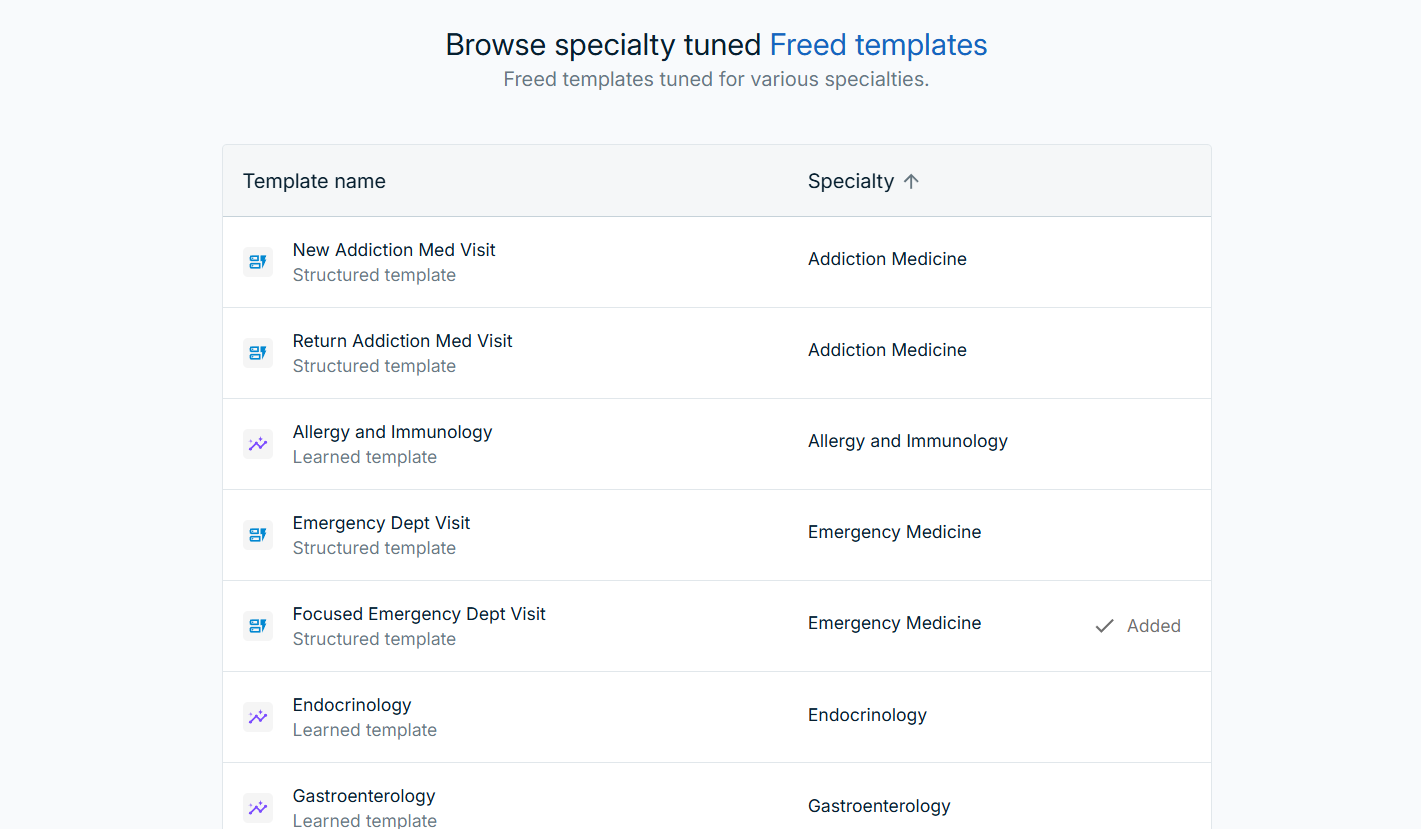
You also get a free trial — with full access to all features, so you can really test how it works in your real-world practice before committing.
Tali AI medical scribe: strengths and key features
Tali is positioning itself as a strong contender in the AI documentation space, especially for practices that are planning for long-term growth.
Here’s what it offers:
1. Scalable for teams
One of Tali’s strongest points is its ability to support multi-provider practices. Whether you’re working in a small group or part of a larger clinic, Tali’s infrastructure is built to handle multiple users under a single organization. This makes it appealing for practices planning for long-term scalability—especially those looking to standardize documentation workflows across a team of providers.
Each provider can have their own login and access the system simultaneously, which is essential for team-based care. Tali’s platform is designed to grow with your practice, although template sharing and collaborative features may be more limited compared to competitors.
2. Dictation Support
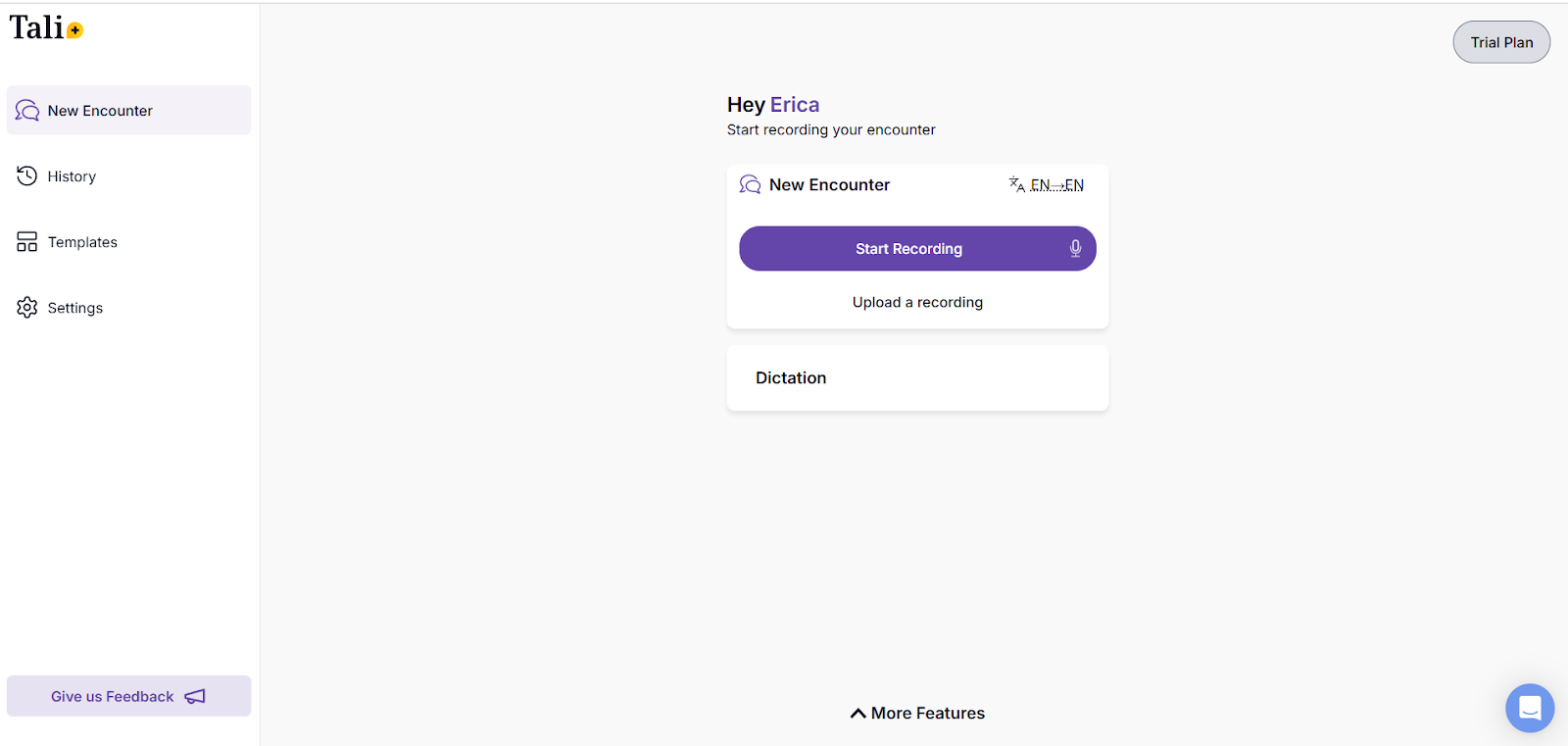
For providers who prefer speaking over typing, Tali includes a built-in dictation system that allows you to record and transcribe notes directly. This can be especially useful during busy clinic days when you want to quickly capture your thoughts between patient visits.
The dictation tool integrates with the scribe functionality, so you can create either a fully AI-generated transcript or insertyour own verbal input. This makes Tali a versatile tool for providers who like to mix structured automation and real-time voice-driven content.
3. "Ask a Medical Question" Tool
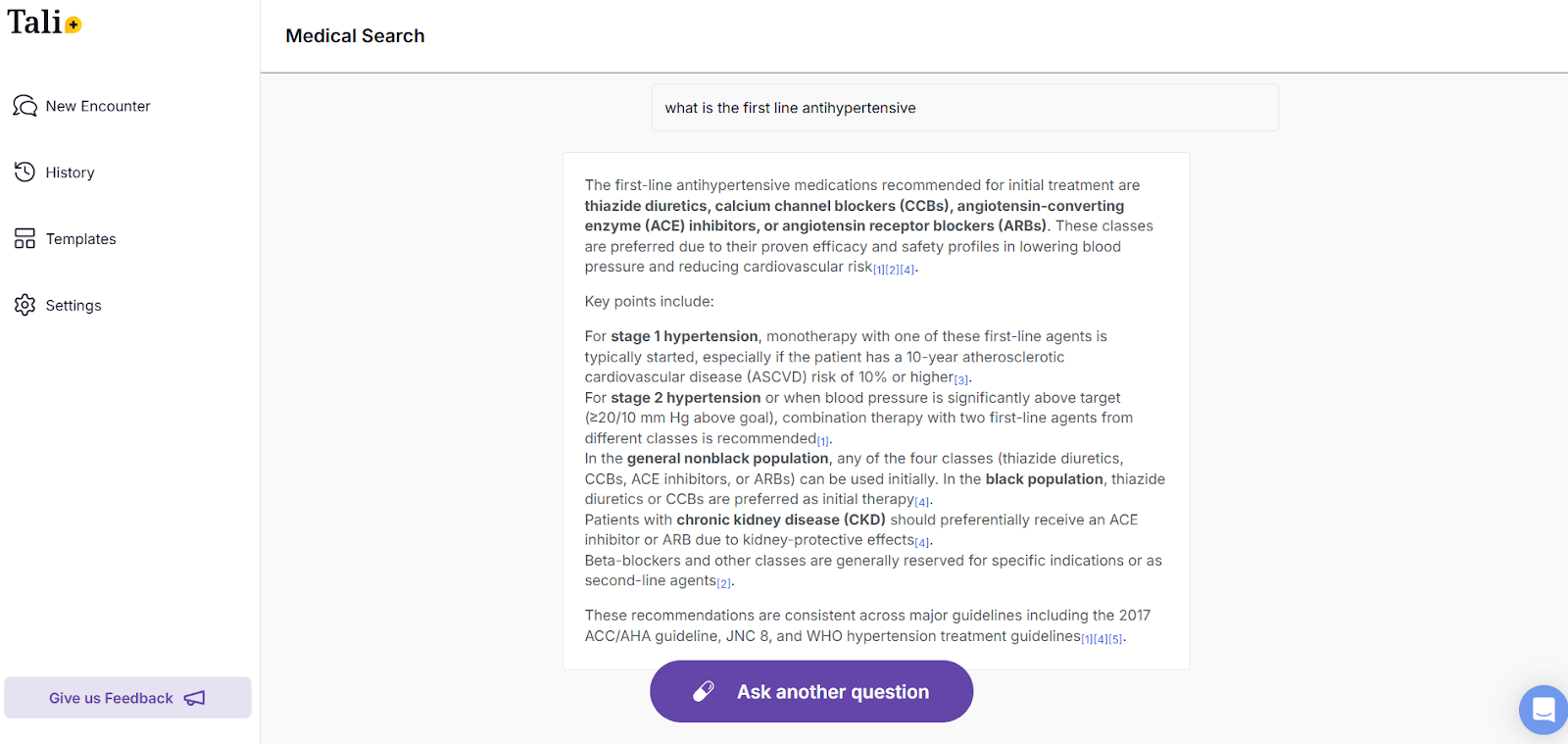
Tali offers a unique AI feature that goes beyond documentation: the ability to ask clinical questions in real time. Among all the AI Medical Scribes I’ve tested, this feature seems unique to Tali.
This tool lets you input queries like "What are the diagnostic criteria for rheumatoid arthritis?" or "What are alternative treatment options for hypertension?" and receive AI-generated responses right in the app.
It’s not a substitute for clinical judgment, but this decision-support tool can be a helpful resource during complex patient visits or when reviewing care plans. It’s an added layer of functionality that could appeal to newer providers or those working in fast-paced, high-acuity environment\
4. Free tier available
Unlike platforms that only offer a time-limited trial, Tali provides a completely free tier with access to basic scribe functionality and limited usage. It’s a great entry point for clinicians who want to experiment with AI charting tools without an upfront investment.
The free plan gives a feel for the interface and workflow integration. However, to unlock more robust features like greater usage limits, team support, or full integration capabilities, you’ll need to upgrade to a paid plan.
Winner, winner: Freed AI medical scribe
Tali AI brings some innovative features to the table, like dictation and real-time medical question support.—In terms of clinical charting, Freed AI delivers a more comprehensive and intuitive solution for healthcare providers.
If you want:
- Truly customizable templates that learn from you
- Simple EHR integration with no tech headaches
- Translation from several languages
- Smart sharing and growth-ready group plans
- A trial that lets you test before you buy
Then Freed is your best bet.
It saves you time, reduces cognitive load, and grows alongside your practice—something Tali doesn’t fully offer right now.
If you're tired of playing catch-up on charting or burning out trying to stay on top of documentation, it’s time to try a smarter way.
👉 Start your free trial with Freed today and experience a better, faster, and more personalized charting process.

Table of Contents
Choosing the Right AI Medical Scribe as a Clinician
Artificial Intelligence (AI) Medical Scribes are truly a game changer for clinicians. I’m talking about cutting documentation time in half without sacrificing quality notes. If you’re not currently using one in your practice, keep reading.
Many clinicians have experienced the constant stress of trying to stay on top of charts through back-to-back patients. Late nights at the clinic, charting at home, and never really feeling caught up — it’s exhausting.
To reclaim my time and restore some work-life balance, I started testing AI medical scribes—digital tools designed to automate and streamline clinical documentation.
Two top contenders in this space are Freed AI Medical Scribe and Tali AI Medical Scribe. Both offer features aimed at saving time, improving charting efficiency, and reducing burnout. But after an in-depth comparison, one stood out as the best solution for nurse practitioners.
Let’s dive into what I found when comparing Freed AI Medical Scribe and Tali AI Medical Scribe.
💡Considering another AI scribe that's in your EHR? See how Freed compares to EHR-native AI scribes
What I tested & why
I approached this comparison by testing Freed AI Medical Scribe and Tali AI Medical Scribe in real clinic scenarios (I work in primary care), and evaluating how they performed in areas that truly matter to busy providers:
- Does it save time during patient visits and between appointments?
- How easy is it to set up and integrate with existing systems?
- Is it customizable and adaptable to each provider’s style?
- Can it scale with a growing team?
- Are the trial and pricing plans accessible?
I wanted to compare not just the tech, but that ways in which each helped me chart faster, without sacrificing note quality.
Freed AI medical scribe: Personalization And long-term growth
After testing both options, Freed offered more in terms of adaptability, personalization, and day-to-day clinical ease. If you’re a clinician looking for a smarter, more sustainable way to chart, Freed delivers.
Here’s why Freed stands out:
1. Customizable + learned templates that evolve with you
This is where Freed truly shines.
Unlike Tali's more static templates, Freed allows you to customize templates for different visit types, specialties, and personal preferences. You can fine-tune sections like HPI, ROS, and Plan with just a few clicks. (Watch this video to learn how to create customizable templates within Freed).
Freed also learns your style over time. The AI adapts to your language, formatting, and phrasing the more you use it — producing increasingly accurate, personalized notes in your own voice. Try the “Learned Templates” for yourself!
2. One-click EHR integration
Freed’s EHR push feature allows you to send finalized notes directly into your browser-based EHR with just a couple of clicks. No IT assistance is needed. Which means you don’t have to beg your clinic manager to use the technology.
Freed AI medical scribe is also affordable, and clinicians can begin using it right away. There are no delays, no downtime, and no headaches for time-strapped clinicians. Tali on the other hand offers EHR integrations that may require tech support.
3. Supports multiple languages + built-in english translation
Have a multilingual patient population? Freed’s scribe tool supports multiple languages and automatically translates the final note into fluent English.
Your documentation is accurate and consistent — no matter what language the visit was conducted in.
4. Referral letters & patient communication tools
Freed is also working on adding referral letters and additional patient letters for providers handling a high volume of specialist referrals or patient updates. I like how Freed is committed to evolving beyond a scribe into a full documentation solution.
5. Designed for individual clinicians and growing teams
Freed offers a thoughtful setup for both solos and growing groups:
- Each clinician gets their own account, and their notes are saved separately.
- You can easily share templates across the team to create uniform workflows.
- Plans are structured to grow with your team, so you’re not locked into a one-size-fits-all solution.
You also get a free trial — with full access to all features, so you can really test how it works in your real-world practice before committing.
Tali AI medical scribe: strengths and key features
Tali is positioning itself as a strong contender in the AI documentation space, especially for practices that are planning for long-term growth.
Here’s what it offers:
1. Scalable for teams
One of Tali’s strongest points is its ability to support multi-provider practices. Whether you’re working in a small group or part of a larger clinic, Tali’s infrastructure is built to handle multiple users under a single organization. This makes it appealing for practices planning for long-term scalability—especially those looking to standardize documentation workflows across a team of providers.
Each provider can have their own login and access the system simultaneously, which is essential for team-based care. Tali’s platform is designed to grow with your practice, although template sharing and collaborative features may be more limited compared to competitors.
2. Dictation Support
For providers who prefer speaking over typing, Tali includes a built-in dictation system that allows you to record and transcribe notes directly. This can be especially useful during busy clinic days when you want to quickly capture your thoughts between patient visits.
The dictation tool integrates with the scribe functionality, so you can create either a fully AI-generated transcript or insertyour own verbal input. This makes Tali a versatile tool for providers who like to mix structured automation and real-time voice-driven content.
3. "Ask a Medical Question" Tool
Tali offers a unique AI feature that goes beyond documentation: the ability to ask clinical questions in real time. Among all the AI Medical Scribes I’ve tested, this feature seems unique to Tali.
This tool lets you input queries like "What are the diagnostic criteria for rheumatoid arthritis?" or "What are alternative treatment options for hypertension?" and receive AI-generated responses right in the app.
It’s not a substitute for clinical judgment, but this decision-support tool can be a helpful resource during complex patient visits or when reviewing care plans. It’s an added layer of functionality that could appeal to newer providers or those working in fast-paced, high-acuity environment\
4. Free tier available
Unlike platforms that only offer a time-limited trial, Tali provides a completely free tier with access to basic scribe functionality and limited usage. It’s a great entry point for clinicians who want to experiment with AI charting tools without an upfront investment.
The free plan gives a feel for the interface and workflow integration. However, to unlock more robust features like greater usage limits, team support, or full integration capabilities, you’ll need to upgrade to a paid plan.
Winner, winner: Freed AI medical scribe
Tali AI brings some innovative features to the table, like dictation and real-time medical question support.—In terms of clinical charting, Freed AI delivers a more comprehensive and intuitive solution for healthcare providers.
If you want:
- Truly customizable templates that learn from you
- Simple EHR integration with no tech headaches
- Translation from several languages
- Smart sharing and growth-ready group plans
- A trial that lets you test before you buy
Then Freed is your best bet.
It saves you time, reduces cognitive load, and grows alongside your practice—something Tali doesn’t fully offer right now.
If you're tired of playing catch-up on charting or burning out trying to stay on top of documentation, it’s time to try a smarter way.
👉 Start your free trial with Freed today and experience a better, faster, and more personalized charting process.
FAQs
Frequently asked questions from clinicians and medical practitioners.

Are AI scribes worth it?

Does Freed integrate with EHRs and EMRs?
Does Freed work for telehealth appointments?
Q. How do AI medical Scribes work?
What is the best AI medical scribe?
How can I get started with Freed?
Does Freed have a free trial?
What happens after the free trial?
What's the learning curve like for Freed?
What is the best AI scribe for family medicine?
What is the best AI scribe for OBGYN?
Related content
Free yourself for better things


548 Market Street, PMB 95301
San Francisco, CA 94104
Specialties
Compliance & Security
Our technology is HIPAA-compliant, uses industry best practices, and doesn’t store patient recordings.



