


8 Best Note-Taking Software for Psychologists [2026]
Therapy notes are supposed to support care, not swallow your evenings.
Yet most therapists and psychologists still spend hours after sessions wrestling with SOAP, DAP, and treatment plans.
Clinicians who use ambient documentation tools experience less charting fatigue and greater documentation‑related well‑being. That’s exactly what the right AI note‑taking software should do for your practice.
Below is a therapist‑focused comparison of the best note‑taking software options, drawing on Reddit threads, G2 reviews, and emerging evidence on ambient AI scribes and the documentation burden.
Best note-taking software for therapists, at a glance
For therapists and psychologists, the right fit usually depends on how how flexible you want your notes, if you want to summaries of progress, and whether you work in a large health system or an independent practice.
How we evaluated note-taking tools for therapists
For our comparison, we looked at a variety of data and reviews based on how therapists actually use AI documentation tools, not just feature lists.
To evaluate each platform, we drew from:
- First-hand clinician discussions on Reddit and professional forums
- Verified G2 and Trustpilot reviews where available
- Publicly available documentation on HIPAA compliance, BAAs, and data handling
- Workflow realism: how notes are actually created, reviewed, and signed in daily practice
- Practice fit: solo therapy, group practices, and health-system settings
We paid particular attention to:
- Documentation quality: Do notes sound clinically appropriate or overly generic?
- Editing burden: How much work is required before a note is ready to sign?
- Capture method: Ambient listening vs dictation vs prompt-based input
- Privacy posture: Audio storage, anonymization, and consent support
- EHR flexibility: Whether tools lock you into a single system or work across workflows
The goal was not to crown a single “winner,” but to reflect the real trade-offs therapists describe when choosing AI note-taking software.
What is AI note-taking software for therapists?
AI note-taking software for therapists uses artificial intelligence to help listen to patient visits and write clinical documentation — like SOAP, DAP, or narrative progress notes — based on therapy sessions or clinician input. It reduces the time and cognitive load spent translating meaningful conversations into documentation.
Today’s therapy-focused AI tools generally fall into four categories:
Ambient AI scribes
These tools listen to live therapy sessions (in person or via telehealth) and automatically generate draft notes from the conversation. They are designed to reduce reliance on memory and post-session reconstruction. Freed and Abridge are examples of ambient documentation tools.
Dictation-based tools
Dictation tools rely on the clinician to verbally summarize the session after it ends. The AI then turns that summary into a structured note. Autonotes, Scribeberry, and TherapyNotes AI largely follow this model. While faster than typing, dictation still requires the therapist to remember and organize key details.
Prompt-based summarization tools
Some platforms allow clinicians to type a few bullet points or prompts—diagnosis, themes, interventions—and generate a note from that input. These tools work best for highly organized therapists or straightforward sessions, but they do not reduce in-session cognitive load.
Measurement-driven documentation tools
Platforms like Blueprint generate notes based on standardized outcome measures (PHQ-9, GAD-7, etc.), sometimes combined with brief text input. This approach aligns well with insurance and measurement-based care, but can feel restrictive for clinicians who prefer narrative process notes.
Across all categories, AI note-taking software aims to address the documentation burden that pulls therapists out of presence with clients and into after-hours charting.
Best note-taking software options for therapists and psychologists
1. Freed

Freed is a purpose-built AI scribe and clinician assistant that provides summaries before the visit, takes accurate notes that learn from your edits, and drafts patient letters, referrals, and more. It's a privacy-centric tool that maintains industry-leading security standards.
Therapists on Reddit describe Freed as “Holy cannoli, it’s real” for automatically drafting easily customizable progress notes directly from their therapy conversations. Freed focuses on turning live or telehealth audio into clean narrative paragraphs that you can push to any EHR. Additionally, Freed’s EHR push allows a one-click push to any browser-based EHR through its Chrome extension.
“Freed frees the therapist to do therapy and leaves the documentation to Freed. It also provides helpful follow-up messages for the clients. It's a game-changer.”
Best for
- Therapists and psychologists who want strong SOAP or narrative notes from live sessions without switching EHRs
- Boutique practices looking for flexible, customizable note-taking tools at a reasonable price
Not as great for
- Large hospital systems
Pros
- HIPAA‑compliant with BAAs on paid plans
- Visit summaries with patient overviews that you can review before each visit
- Customizable paragraph‑style notes that often need only light editing, according to multiple Reddit and G2 reviewers
- Flexible templates that learn from your edits and adapt to your writing style
- Instant ICD-10 codes generated
- Instant patient instructions, letters, referrals, and more
- Works across devices and fits with workflows like Zoom, so you can use it for both in‑person and telehealth sessions
Cons
- Free trial lasts only 7 days, no permanent free tier
2. Autonotes

Many psychologists use Autonotes as a kind of “prompt‑in, note‑out” tool: give it a few sentences and a diagnosis, and it produces a structured draft. Its workflow feels a lot like traditional dictation, but with standardized therapy templates on top. When clinicians must reconstruct sessions from memory, both time and error risk stay high, so Autonotes works best for organized therapists who already keep tight mental summaries.
One G2 user notes, “The transcription is very precise and even picks up on things that were said in a conversation.”
On Reddit, another user says, “Autonotes is the best! And the customer service is awesome. They’re constantly expanding and upgrading. Recommend without hesitation!”
Best for
- Therapists and psychologists who already summarize sessions verbally and want structured notes from those recaps
- Solo practitioners who like a low‑commitment, pay‑per‑use model instead of another monthly subscription
Not as great for
- Clinicians who want full‑session transcripts or rich context such as goals, themes, and process notes
- High‑volume group practices that need standardized workflows across many therapists
Pros
- Quickly generates SOAP, SIRP, and DAP drafts from short prompts, saving writing time on straightforward cases
- Budget‑friendly pay‑per‑use pricing, which can be ideal if you are testing AI note‑taking or have variable caseloads
- No need to record entire sessions, which appeals to therapists cautious about storing audio
Cons
- Note quality depends heavily on how specific your prompts are, leading to more editing if you are rushed
- No full‑session recording or ambient capture, so you still carry the cognitive load of remembering key details
3. Upheal

Upheal could be described as an “all‑in‑one” platform: it records therapy sessions (with consent), generates transcripts, exports SOAP/DAP/GIRP notes, and surfaces insights like goals and themes over time. For some psychologists, that depth is overkill; for others, it is exactly what they want to support long‑term work and supervision. Upheal also can create notes in different languages, like English, Spanish, Mandarin, and Hindi, among others. Upheal will appeal most to psychologists who view AI as a partner in formulation and supervision, not just paperwork.
Reddit user Stock_Industry_3489 notes, “General AI models are not HIPAA-compliant. But there are platforms that are HIPAA compliant and actually take it a step further with SOC2 Type 2 verification. Such as Upheal.”
Best for
- Group practices and supervisors who need standardized documentation and data to support QA and case reviews
Not as great for
- Clinicians who never want audio or analytics stored in a vendor’s cloud, regardless of HIPAA assurances
- Providers who want the simplest possible “record and paste a note” experience without extra dashboards
Pros
- Multi‑format exports (SOAP, DAP, GIRP) fall right into common psychotherapy note standards
- Built‑in consent flows support ethical recording in therapy
- Analytics, goals, and insight views can support better formulation and supervision over the course of treatment.
Cons
- Audio and derived analytics are stored in the cloud, which some privacy‑focused clinicians avoid
- Interface complexity and bandwidth demands can make it feel heavy compared with lighter note‑only tools
4. Mentalyc

Mentalyc comes up again and again in online discussions as an AI note‑taking tool that leads with privacy: some therapists specifically like that transcripts can be anonymized to limit subpoena exposure. Mentalyc focuses on therapists and psychologists, rather than general medical documentation.
One Reddit user notes, “I use Mentalyc (approximately 8 months). Overall, I like it. There are a few issues, but it saves me time… You do need to get in the habit of recording sessions for upload; this hasn't been a problem for me. I upload my sessions before I leave for the day and review and input them into our EPM program the next morning.”
Best for
- Therapists and psychologists who treat highly sensitive populations and want the strongest possible privacy posture
- Clinicians who like both live dictation and upload workflows but prefer not to keep raw recordings
Not as great for
- Providers who expect zero hallucinations or mis‑phrasing from AI and are unwilling to review every note
- Clinicians who need offline or native mobile apps for field‑based or in‑home work
Pros
- Strong privacy messaging, with anonymized transcripts and clear policies on how data are handled
- Built from the ground up for therapists, with support for multiple therapy note formats and client types
- Offers informed‑consent templates and guidance, making it easier to bring clients into the loop about AI use
Cons
- Some therapists report occasional hallucinations or off‑target details, requiring careful review
- Browser‑only interface with a relatively busy UI can slow adoption for clinicians who prefer super‑simple tools
5. Scribeberry

Scribeberry is a lightweight dictation‑to‑note tool. Online, most feedback focuses on general usability and speed rather than deep psychotherapy features. For brief, solution‑focused sessions or structured check‑ins, its simplicity can be a plus. Scriberry makes sense for straightforward visits, but may be too bare bones for complex psychological work. It’s gotten mixed reviews online.
One Trustpilot user writes, “Scribeberry has been a game-changer for my practice with regard to summarizing clinical data and pulling out themes - tasks I struggle with due to ADHD. It’s like having a second brain and allows me to be more present with clients.”
Best for
- Therapists who run shorter, highly structured sessions and just want quick dictation‑based notes
- Clinicians who prefer a minimal UI without analytics, dashboards, or complex configurations
Not as great for
- Complex psychotherapy with rich narrative, multiple modalities, or intricate treatment planning
- Practices that need robust multi‑speaker support or deep template customization
Pros
- Simple and fast dictation pipeline with minimal setup
- Lower‑cost subscription options compared with more full‑featured platforms
- Good fit if you want a familiar dictation workflow plus basic structure
Cons
- Fewer mental‑health‑specific templates and limited support for nuanced therapy language
- Web‑only with less advanced support for offline or desktop‑first workflows
6. Abridge
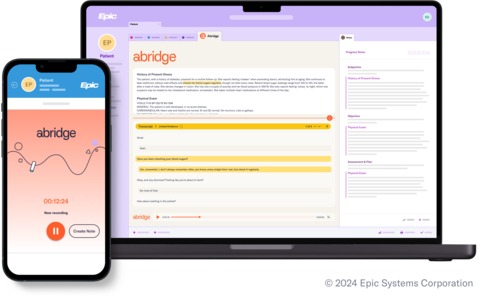
Abridge is widely used in medical specialties and increasingly shows up in psychiatry and integrated behavioral‑health settings, where visits often combine med management with psychotherapy. It provides real‑time transcription and summarization that push structured notes into the chart.
One G2 user notes, “Great summary of encounters, comprehensive prose and good plan and patient summary.”
Best for
- Psychiatrists and psychologists embedded in hospital or large‑system clinics
- Teams that want one ambient tool for both medical and mental‑health visits with strong EHR integration
Not as great for
- Solo therapists in private practice who neither need nor want enterprise‑style integrations
- Clinicians who prefer cheaper, simpler record‑and‑paste workflows instead of deeper EHR coupling
Pros
- Real‑time ambient transcription that captures both psychiatric and medical details
- Structured templates and EHR integration help reduce double documentation and support quality metrics
- Enterprise‑grade security and compliance suitable for hospital environments
Cons
- Enterprise pricing and onboarding can be overkill for small practices
- The UI language is generic, so not ideal for therapists who want to add more of their own voice
7. TherapyNotes AI

Many therapists already rely on TherapyNotes for scheduling, billing, and documentation, and its AI TherapyFuel gives those users a built‑in way to generate note drafts without leaving the EHR. It takes dictation or typed summaries and produces SOAP or DAP‑style notes directly in the TherapyNotes interface.
Best for
- Therapists and psychologists who already use TherapyNotes and want AI support without adding another standalone tool
- Practices that value keeping all workflows—billing, documentation, and AI—inside one HIPAA‑compliant platform
Not as great for
- Clinicians on other EHRs or non‑EHR workflows
- Users who want highly nuanced, specialty‑tuned language rather than more generic drafts
Pros
- Embedded directly in TherapyNotes, avoiding copy‑and‑paste and keeping everything in one system
- Supports common therapy formats like SOAP and DAP
- Includes AI settings and consent language in the same place you manage the rest of your notes
Cons
- Independent reviews characterize it as “good but generic,” meaning you still need to refine tone and nuance
- Available only inside TherapyNotes, so you cannot use it if your practice runs on other platforms
8. Blueprint

Blueprint is not a traditional AI scribe, but it uses standardized outcome measures (like PHQ‑9 and GAD‑7) to generate structured progress notes and track change over time. That makes it especially attractive for psychologists in insurance‑heavy, measurement‑based care environments. If your practice already leans heavily on measures and structured outcomes, Blueprint may be the right choice for you.
One Reddit user notes, “I use Blueprint and I love it. It’s HIPAA compliant, doesn’t sell the info, is a private company….It simply organizes my thoughts in a way that’s more coherent. You can add or delete as you wish and you should definitely read everything it generates from your notes to be sure it’s correct.”
Best for
- Therapists and psychologists in clinics where insurers expect regular use of validated scales
- Practices that want dashboards showing symptom change, engagement, and outcomes, alongside notes
Not as great for
- Private‑pay or boutique practices where measurement scales are used infrequently
- Therapists who prefer free‑form narrative notes and rich process descriptions
Pros
- Generates notes from rating‑scale data plus text, making documentation clearly linked to treatment goals and outcomes
- Provides progress charts and measurement‑based care tools
- Integrates with some EHRs, reducing manual entry
Cons
- Note language can feel constrained by the scales, which may not capture nuanced psychodynamics
- Per‑client or per‑use pricing can add up for large caseloads
How to choose the best note-taking software for your practice
Online, therapists tend to cluster around a few key decision points when they talk about AI note‑taking tools: whether to record sessions, how much editing they are willing to do, and how tightly they want the tool tied to their EHR.
JAMA Network Open’s work on ambient documentation and documentation burden suggests those preferences shape not just convenience, but also burnout and perceived quality.
For many clinicians:
- If you want strong, customizable, accurate notes from live therapy conversations and do not want to change EHRs, Freed offers a balance of ambient‑style capture and flexible “paste anywhere” output.
- If you work inside a health system, enterprise tools such as Abridge and DAX plug directly into the EHR and mirror the ambient documentation models evaluated in JAMA studies — but they are often inaccessible to independent psychologists and therapists.
The best note‑taking software for therapists and psychologists in 2026 is the one that actually gets you out of the office on time, keeps you confident in what you sign, and fits the privacy promises you make to your patients. Data suggests that when ambient and AI‑supported documentation is implemented well, it can deliver all three.
Ready to see what an AI scribe can do for your practice?
Therapy notes should support your work without following you home.
The best AI note-taking software isn’t the one with the most features, but the one that fits how you actually practice, respects your clinical judgment, and lightens the mental load of documentation.
Whether you prefer ambient listening, structured prompts, or traditional dictation, the right tool can help you stay present in session and leave the office on time. The goal isn’t perfect notes — it’s sustainable care for both you and your clients.


Table of Contents
Therapy notes are supposed to support care, not swallow your evenings.
Yet most therapists and psychologists still spend hours after sessions wrestling with SOAP, DAP, and treatment plans.
Clinicians who use ambient documentation tools experience less charting fatigue and greater documentation‑related well‑being. That’s exactly what the right AI note‑taking software should do for your practice.
Below is a therapist‑focused comparison of the best note‑taking software options, drawing on Reddit threads, G2 reviews, and emerging evidence on ambient AI scribes and the documentation burden.
Best note-taking software for therapists, at a glance
For therapists and psychologists, the right fit usually depends on how how flexible you want your notes, if you want to summaries of progress, and whether you work in a large health system or an independent practice.
How we evaluated note-taking tools for therapists
For our comparison, we looked at a variety of data and reviews based on how therapists actually use AI documentation tools, not just feature lists.
To evaluate each platform, we drew from:
- First-hand clinician discussions on Reddit and professional forums
- Verified G2 and Trustpilot reviews where available
- Publicly available documentation on HIPAA compliance, BAAs, and data handling
- Workflow realism: how notes are actually created, reviewed, and signed in daily practice
- Practice fit: solo therapy, group practices, and health-system settings
We paid particular attention to:
- Documentation quality: Do notes sound clinically appropriate or overly generic?
- Editing burden: How much work is required before a note is ready to sign?
- Capture method: Ambient listening vs dictation vs prompt-based input
- Privacy posture: Audio storage, anonymization, and consent support
- EHR flexibility: Whether tools lock you into a single system or work across workflows
The goal was not to crown a single “winner,” but to reflect the real trade-offs therapists describe when choosing AI note-taking software.
What is AI note-taking software for therapists?
AI note-taking software for therapists uses artificial intelligence to help listen to patient visits and write clinical documentation — like SOAP, DAP, or narrative progress notes — based on therapy sessions or clinician input. It reduces the time and cognitive load spent translating meaningful conversations into documentation.
Today’s therapy-focused AI tools generally fall into four categories:
Ambient AI scribes
These tools listen to live therapy sessions (in person or via telehealth) and automatically generate draft notes from the conversation. They are designed to reduce reliance on memory and post-session reconstruction. Freed and Abridge are examples of ambient documentation tools.
Dictation-based tools
Dictation tools rely on the clinician to verbally summarize the session after it ends. The AI then turns that summary into a structured note. Autonotes, Scribeberry, and TherapyNotes AI largely follow this model. While faster than typing, dictation still requires the therapist to remember and organize key details.
Prompt-based summarization tools
Some platforms allow clinicians to type a few bullet points or prompts—diagnosis, themes, interventions—and generate a note from that input. These tools work best for highly organized therapists or straightforward sessions, but they do not reduce in-session cognitive load.
Measurement-driven documentation tools
Platforms like Blueprint generate notes based on standardized outcome measures (PHQ-9, GAD-7, etc.), sometimes combined with brief text input. This approach aligns well with insurance and measurement-based care, but can feel restrictive for clinicians who prefer narrative process notes.
Across all categories, AI note-taking software aims to address the documentation burden that pulls therapists out of presence with clients and into after-hours charting.
Best note-taking software options for therapists and psychologists
1. Freed
Freed is a purpose-built AI scribe and clinician assistant that provides summaries before the visit, takes accurate notes that learn from your edits, and drafts patient letters, referrals, and more. It's a privacy-centric tool that maintains industry-leading security standards.
Therapists on Reddit describe Freed as “Holy cannoli, it’s real” for automatically drafting easily customizable progress notes directly from their therapy conversations. Freed focuses on turning live or telehealth audio into clean narrative paragraphs that you can push to any EHR. Additionally, Freed’s EHR push allows a one-click push to any browser-based EHR through its Chrome extension.
“Freed frees the therapist to do therapy and leaves the documentation to Freed. It also provides helpful follow-up messages for the clients. It's a game-changer.”
Best for
- Therapists and psychologists who want strong SOAP or narrative notes from live sessions without switching EHRs
- Boutique practices looking for flexible, customizable note-taking tools at a reasonable price
Not as great for
- Large hospital systems
Pros
- HIPAA‑compliant with BAAs on paid plans
- Visit summaries with patient overviews that you can review before each visit
- Customizable paragraph‑style notes that often need only light editing, according to multiple Reddit and G2 reviewers
- Flexible templates that learn from your edits and adapt to your writing style
- Instant ICD-10 codes generated
- Instant patient instructions, letters, referrals, and more
- Works across devices and fits with workflows like Zoom, so you can use it for both in‑person and telehealth sessions
Cons
- Free trial lasts only 7 days, no permanent free tier
2. Autonotes
Many psychologists use Autonotes as a kind of “prompt‑in, note‑out” tool: give it a few sentences and a diagnosis, and it produces a structured draft. Its workflow feels a lot like traditional dictation, but with standardized therapy templates on top. When clinicians must reconstruct sessions from memory, both time and error risk stay high, so Autonotes works best for organized therapists who already keep tight mental summaries.
One G2 user notes, “The transcription is very precise and even picks up on things that were said in a conversation.”
On Reddit, another user says, “Autonotes is the best! And the customer service is awesome. They’re constantly expanding and upgrading. Recommend without hesitation!”
Best for
- Therapists and psychologists who already summarize sessions verbally and want structured notes from those recaps
- Solo practitioners who like a low‑commitment, pay‑per‑use model instead of another monthly subscription
Not as great for
- Clinicians who want full‑session transcripts or rich context such as goals, themes, and process notes
- High‑volume group practices that need standardized workflows across many therapists
Pros
- Quickly generates SOAP, SIRP, and DAP drafts from short prompts, saving writing time on straightforward cases
- Budget‑friendly pay‑per‑use pricing, which can be ideal if you are testing AI note‑taking or have variable caseloads
- No need to record entire sessions, which appeals to therapists cautious about storing audio
Cons
- Note quality depends heavily on how specific your prompts are, leading to more editing if you are rushed
- No full‑session recording or ambient capture, so you still carry the cognitive load of remembering key details
3. Upheal
Upheal could be described as an “all‑in‑one” platform: it records therapy sessions (with consent), generates transcripts, exports SOAP/DAP/GIRP notes, and surfaces insights like goals and themes over time. For some psychologists, that depth is overkill; for others, it is exactly what they want to support long‑term work and supervision. Upheal also can create notes in different languages, like English, Spanish, Mandarin, and Hindi, among others. Upheal will appeal most to psychologists who view AI as a partner in formulation and supervision, not just paperwork.
Reddit user Stock_Industry_3489 notes, “General AI models are not HIPAA-compliant. But there are platforms that are HIPAA compliant and actually take it a step further with SOC2 Type 2 verification. Such as Upheal.”
Best for
- Group practices and supervisors who need standardized documentation and data to support QA and case reviews
Not as great for
- Clinicians who never want audio or analytics stored in a vendor’s cloud, regardless of HIPAA assurances
- Providers who want the simplest possible “record and paste a note” experience without extra dashboards
Pros
- Multi‑format exports (SOAP, DAP, GIRP) fall right into common psychotherapy note standards
- Built‑in consent flows support ethical recording in therapy
- Analytics, goals, and insight views can support better formulation and supervision over the course of treatment.
Cons
- Audio and derived analytics are stored in the cloud, which some privacy‑focused clinicians avoid
- Interface complexity and bandwidth demands can make it feel heavy compared with lighter note‑only tools
4. Mentalyc
Mentalyc comes up again and again in online discussions as an AI note‑taking tool that leads with privacy: some therapists specifically like that transcripts can be anonymized to limit subpoena exposure. Mentalyc focuses on therapists and psychologists, rather than general medical documentation.
One Reddit user notes, “I use Mentalyc (approximately 8 months). Overall, I like it. There are a few issues, but it saves me time… You do need to get in the habit of recording sessions for upload; this hasn't been a problem for me. I upload my sessions before I leave for the day and review and input them into our EPM program the next morning.”
Best for
- Therapists and psychologists who treat highly sensitive populations and want the strongest possible privacy posture
- Clinicians who like both live dictation and upload workflows but prefer not to keep raw recordings
Not as great for
- Providers who expect zero hallucinations or mis‑phrasing from AI and are unwilling to review every note
- Clinicians who need offline or native mobile apps for field‑based or in‑home work
Pros
- Strong privacy messaging, with anonymized transcripts and clear policies on how data are handled
- Built from the ground up for therapists, with support for multiple therapy note formats and client types
- Offers informed‑consent templates and guidance, making it easier to bring clients into the loop about AI use
Cons
- Some therapists report occasional hallucinations or off‑target details, requiring careful review
- Browser‑only interface with a relatively busy UI can slow adoption for clinicians who prefer super‑simple tools
5. Scribeberry
Scribeberry is a lightweight dictation‑to‑note tool. Online, most feedback focuses on general usability and speed rather than deep psychotherapy features. For brief, solution‑focused sessions or structured check‑ins, its simplicity can be a plus. Scriberry makes sense for straightforward visits, but may be too bare bones for complex psychological work. It’s gotten mixed reviews online.
One Trustpilot user writes, “Scribeberry has been a game-changer for my practice with regard to summarizing clinical data and pulling out themes - tasks I struggle with due to ADHD. It’s like having a second brain and allows me to be more present with clients.”
Best for
- Therapists who run shorter, highly structured sessions and just want quick dictation‑based notes
- Clinicians who prefer a minimal UI without analytics, dashboards, or complex configurations
Not as great for
- Complex psychotherapy with rich narrative, multiple modalities, or intricate treatment planning
- Practices that need robust multi‑speaker support or deep template customization
Pros
- Simple and fast dictation pipeline with minimal setup
- Lower‑cost subscription options compared with more full‑featured platforms
- Good fit if you want a familiar dictation workflow plus basic structure
Cons
- Fewer mental‑health‑specific templates and limited support for nuanced therapy language
- Web‑only with less advanced support for offline or desktop‑first workflows
6. Abridge
Abridge is widely used in medical specialties and increasingly shows up in psychiatry and integrated behavioral‑health settings, where visits often combine med management with psychotherapy. It provides real‑time transcription and summarization that push structured notes into the chart.
One G2 user notes, “Great summary of encounters, comprehensive prose and good plan and patient summary.”
Best for
- Psychiatrists and psychologists embedded in hospital or large‑system clinics
- Teams that want one ambient tool for both medical and mental‑health visits with strong EHR integration
Not as great for
- Solo therapists in private practice who neither need nor want enterprise‑style integrations
- Clinicians who prefer cheaper, simpler record‑and‑paste workflows instead of deeper EHR coupling
Pros
- Real‑time ambient transcription that captures both psychiatric and medical details
- Structured templates and EHR integration help reduce double documentation and support quality metrics
- Enterprise‑grade security and compliance suitable for hospital environments
Cons
- Enterprise pricing and onboarding can be overkill for small practices
- The UI language is generic, so not ideal for therapists who want to add more of their own voice
7. TherapyNotes AI
Many therapists already rely on TherapyNotes for scheduling, billing, and documentation, and its AI TherapyFuel gives those users a built‑in way to generate note drafts without leaving the EHR. It takes dictation or typed summaries and produces SOAP or DAP‑style notes directly in the TherapyNotes interface.
Best for
- Therapists and psychologists who already use TherapyNotes and want AI support without adding another standalone tool
- Practices that value keeping all workflows—billing, documentation, and AI—inside one HIPAA‑compliant platform
Not as great for
- Clinicians on other EHRs or non‑EHR workflows
- Users who want highly nuanced, specialty‑tuned language rather than more generic drafts
Pros
- Embedded directly in TherapyNotes, avoiding copy‑and‑paste and keeping everything in one system
- Supports common therapy formats like SOAP and DAP
- Includes AI settings and consent language in the same place you manage the rest of your notes
Cons
- Independent reviews characterize it as “good but generic,” meaning you still need to refine tone and nuance
- Available only inside TherapyNotes, so you cannot use it if your practice runs on other platforms
8. Blueprint
Blueprint is not a traditional AI scribe, but it uses standardized outcome measures (like PHQ‑9 and GAD‑7) to generate structured progress notes and track change over time. That makes it especially attractive for psychologists in insurance‑heavy, measurement‑based care environments. If your practice already leans heavily on measures and structured outcomes, Blueprint may be the right choice for you.
One Reddit user notes, “I use Blueprint and I love it. It’s HIPAA compliant, doesn’t sell the info, is a private company….It simply organizes my thoughts in a way that’s more coherent. You can add or delete as you wish and you should definitely read everything it generates from your notes to be sure it’s correct.”
Best for
- Therapists and psychologists in clinics where insurers expect regular use of validated scales
- Practices that want dashboards showing symptom change, engagement, and outcomes, alongside notes
Not as great for
- Private‑pay or boutique practices where measurement scales are used infrequently
- Therapists who prefer free‑form narrative notes and rich process descriptions
Pros
- Generates notes from rating‑scale data plus text, making documentation clearly linked to treatment goals and outcomes
- Provides progress charts and measurement‑based care tools
- Integrates with some EHRs, reducing manual entry
Cons
- Note language can feel constrained by the scales, which may not capture nuanced psychodynamics
- Per‑client or per‑use pricing can add up for large caseloads
How to choose the best note-taking software for your practice
Online, therapists tend to cluster around a few key decision points when they talk about AI note‑taking tools: whether to record sessions, how much editing they are willing to do, and how tightly they want the tool tied to their EHR.
JAMA Network Open’s work on ambient documentation and documentation burden suggests those preferences shape not just convenience, but also burnout and perceived quality.
For many clinicians:
- If you want strong, customizable, accurate notes from live therapy conversations and do not want to change EHRs, Freed offers a balance of ambient‑style capture and flexible “paste anywhere” output.
- If you work inside a health system, enterprise tools such as Abridge and DAX plug directly into the EHR and mirror the ambient documentation models evaluated in JAMA studies — but they are often inaccessible to independent psychologists and therapists.
The best note‑taking software for therapists and psychologists in 2026 is the one that actually gets you out of the office on time, keeps you confident in what you sign, and fits the privacy promises you make to your patients. Data suggests that when ambient and AI‑supported documentation is implemented well, it can deliver all three.
Ready to see what an AI scribe can do for your practice?
Therapy notes should support your work without following you home.
The best AI note-taking software isn’t the one with the most features, but the one that fits how you actually practice, respects your clinical judgment, and lightens the mental load of documentation.
Whether you prefer ambient listening, structured prompts, or traditional dictation, the right tool can help you stay present in session and leave the office on time. The goal isn’t perfect notes — it’s sustainable care for both you and your clients.
FAQs
Frequently asked questions from clinicians and medical practitioners.
Related content
Free yourself for better things


548 Market Street, PMB 95301
San Francisco, CA 94104
Specialties
Compliance & Security
Our technology is HIPAA-compliant, uses industry best practices, and doesn’t store patient recordings.



